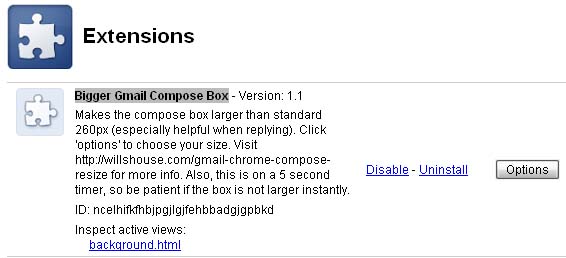
Bigger Gmail Compose Box

A Gmail Compose Resize Extension for Google Chrome

Details:

Have you ever wanted a larger compose box for gMail? especially when using g-mail to reply to a conversation?

I give them credit, most times when composing a new message or using it in full-screen mode, it does well. But if you’re like me, about 80% of your conversations are replies. And that is, after all, what is great about g-mail, right? The awesome threading capabilities.

So why doesn’t g-mail support a resizeable compose box? You are stuck with a fixed size, of about 260 px, even in the Chrome browser!!! A browser that is know to let you resize text boxes by default!

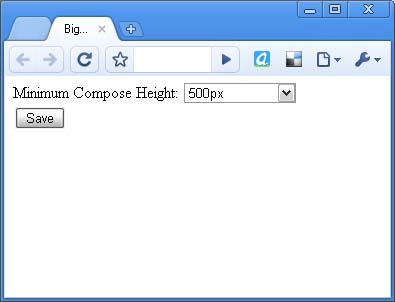
Well, I don’t know the answers to these questions, but they are frustrating, so I’ve written an extension for Chrome (or Chromium) which allows you to specify how big you want that box to be, and then it automatically resizes it (it make take a few seconds after you hit reply to fully grow).

Update: As of 2/7/2012 I’ve written a newer, and more updated extension download it here

Download the extension here:

Bigger Gmail Compose Box

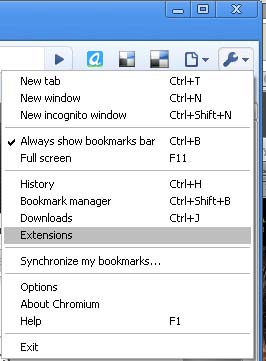
It has an options page, which you can access by going to settings (wrench icon) and then extensions. I have also added in auto-update for this extension. I’m really quite pleased with it and wanted to share.

Let me know what you think.

Having trouble? Didn’t know that Chrome allows extensions? You probably need to upgrade to the latest version. This is tested and working for the 4.x versions, so get the latest chrome now, and after downloading, you need to enable extensions.

Alternatively, if you want a one-click extension install, I suggest using Chromium (which is the development version of Chrome) because it has a lot more power and features and extensions are enabled by default.

See my posts on Downloading the latest Chromium and Chromium is not Chrome.

Also, for other great extensions, check out Chrome Extensions.
Bigger Gmail Compose Box
gmail compose resize for chrome
Gmail Compose Box Larger

Related Posts:

This entry was posted in Software, Tech Tips, Web Development and tagged , , , , , , , , . Bookmark the permalink.

21 Responses to Bigger Gmail Compose Box

  1. sergi says:

    YES!!! at last! it works perfectly. Thank you so so so much!
    Lots of people looking for that, make sure it get on the chrome – Gmail help forums!
    congrat!

  2. Howard says:

    Good afternoon.

    I just downloaded and installed your new version of the compose window resizer. Really appreciate the work on this. Unfortunately, I cannot find any way to set the window size option. I am running Chrome 17.0.963.46 on Ubuntu 11.10.

    Thank you.
    Howard

  3. W says:

    There isn’t an options page currently, it is hard coded to a 600px height. I’d like to add a page to select the height, and will hopefully update the extension in the future, but don’t have time today. If you leave a comment on my blog you can click the “subscribe to comments” button and be notified of future updates.

  4. Howard says:

    Thanks for the quick reply. I’m fairly good with code. If I know what to look at. Can I modify your .js to change the default height and also to set a default width? Thx.

  5. W says:

    sure – the file is very small and easy to read. on the website right click and choose “save as” instead of clicking the link. then look for the min-height 600px and change that to the height you want. the file must must end with .user.js before chrome will install it. i’m not sure if it can be installed from your hard drive by dragging it on to chrome or if it needs to be on a web server and accessed via http:// to load. good luck!

  6. Mark Townsend says:

    Just what I was looking for!

    Now I want the Options page.

    Mac OSX and Chrome Release Candidate (both latest)

  7. Logan Zachary says:

    THANK GOD. Who on earth can stand composing multi-paragraph emails in the little tweetbox that Gmail default provides? This ought to be any sane person’s first and last Gmail extension.

  8. matt says:

    THANK YOU!!!! This has been driving me nuts! Wayyyy better now.

  9. athales says:

    Je pense aussi que vous avez tout int

  10. Nrupesh Soni says:

    Seriously… I spent MONTHS trying to find something and today when looking for help on how to make something like this I find this! Why havent you put this on Chrome webstore yet?

    Also, how do I change the height to make it longer??

    Its surprising how so few people have a problem with the small box that Gmail provides when replying a message…

  11. John says:

    Thank you so much for this–very helpful!

  12. Mark Townsend says:

    I just did the min-height mod you mention above… and it worked fine. I bragged the file into a Chrome window and it installed.

    Can you now make it control the size of the compose window for replies?

  13. Daniel says:

    THANK YOU SO MUCH!

    I love gmail but this was something really, really frustrating.

    GREAT!!!!!!!!

  14. Jay says:

    Any plans to add the options page soon? Great extension btw.

  15. James says:

    Great extension! This has really helped me out a bunch when composing messages!

  16. Joannes says:

    Very cool! Great improvement. Thanks so much for this.

    Any chance it will soon be possible to resize the text box when replying? For now doesn’t, so I think I will still be on firefox when gmailing, cause the resize extension there does increase the box size for replies also.

  17. Michael says:

    I’m trying to install your extension (the updated link) but it’s telling me extensions can only be installed from the Chrome store – can you help please?

  18. W says:

    @Michael – yes with newer versions of chrome the extensions have to be signed and I haven’t got around to that yet. To install it anyways, download the file (right click and save) and then open your extensions preference pane, and then drag the file on to the browser and I believe that should work.

  19. Michael says:

    Great – that worked -thanks

  20. prakash says:

    i need gmail compose plugins with php code pls send the code

  21. Ondrej Bedajanek says:

    Cannot see option for size

Leave a Reply

Your email address will not be published. Required fields are marked *

You may use these HTML tags and attributes: <a href="" title=""> <abbr title=""> <acronym title=""> <b> <blockquote cite=""> <cite> <code> <del datetime=""> <em> <i> <q cite=""> <strike> <strong>