
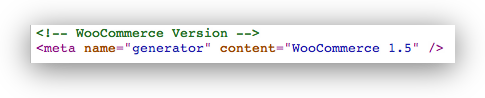
If you would like to remove the Remove WooCommerce Generator Tag from the `
` section of your WordPress installation, you can add the following line somewhere, perhaps in your wordpress `functions.php` file:`remove_action(‘wp_head’, array($GLOBALS[‘woocommerce’],’generator’));`
I’ve updated the code to work with the most recent version of Woo Commerce, try adding this to the `functions.php` file of your WordPress theme:
function remove_woo_commerce_generator_tag()
{
remove_action(‘wp_head’,array($GLOBALS[‘woocommerce’], ‘generator’));
}
add_action(‘get_header’,’remove_woo_commerce_generator_tag’);
That will prevent the following line from being shown in your HTML code:

8 Responses to Remove WooCommerce Generator Tag