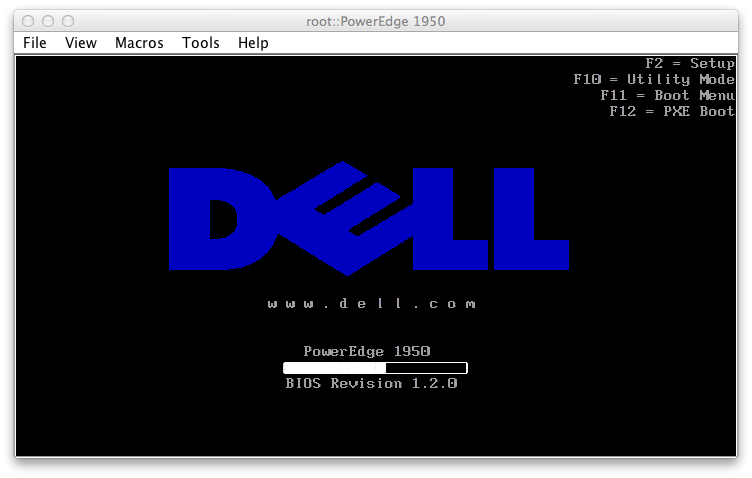
When recently using Intel Active Management Technology (AMT) I was remotely connected via the RealVNC client, but was having trouble sending keystrokes like F2 to enter the BIOS, F12 to select a startup device, or F8 to access the Windows startup menu.
This setup is complicated for a few reasons – first I’m using a Mac keyboard. Secondly, OS X remaps the function keys to do things like dashboard, expose, brightness, and volume by default.
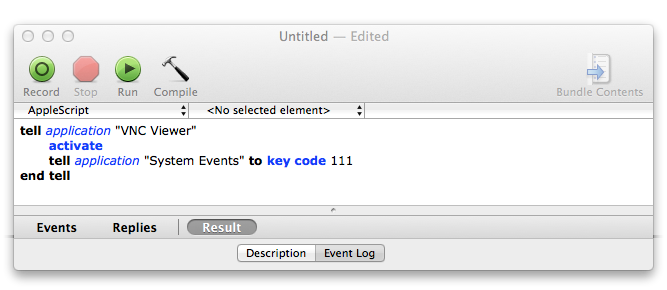
After a little searching and trial and error, I found that I can use the free utility included with Mac OS X – AppleScript Editor.app – to send keycodes to the VNC connection. Here’s the code for the applescript you can use to send the F12 key:
tell application "VNC Viewer"
activate
tell application "System Events" to key code 111
end tell
This is what it should look like in the editor:

To send key combos, like holding down alt and pressing F4, the syntax would be something like this:
tell application "System Events" to key code 118 using {command down}
We use command instead of alt because that is how Real VNC Viewer translates the “alt” key for a remote windows system by default.
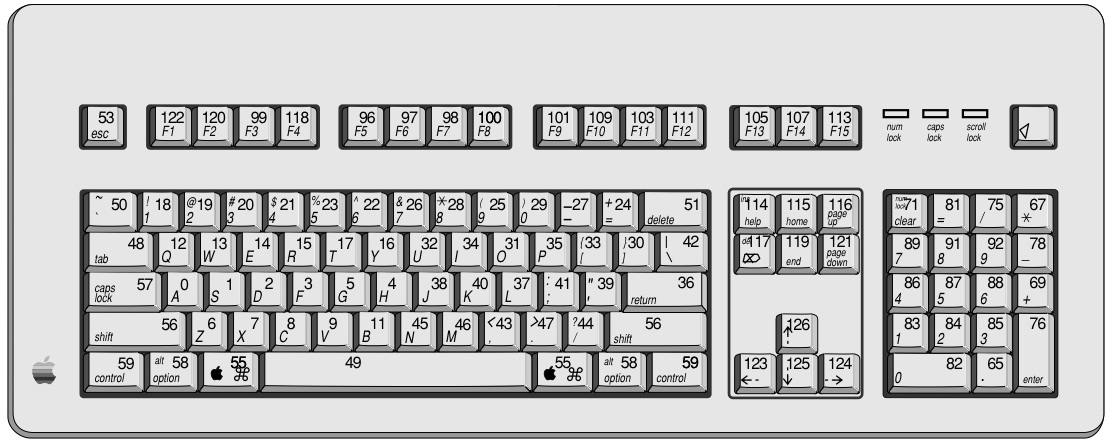
To send other keyboard F-keys to the remote Windows machine, use the table below to find the appropriate key – make sure to reference the “Mac” column even if the remote machine is a Windows box.
What about JAVA?
But what happens if you are running a java applet for a KVM console? How do you tell java to do a keycode?

To tell java to send F12 try this:
tell application "System Events" to set frontmost of process "java" to true
tell application "System Events"
tell process "java"
key code 111
end tell
end tell
| Key | Mac | Windows | Linux | Notes |
| KeyUp | 126 | 26 | 103 | |
| KeyDown | 125 | 28 | 108 | |
| KeyLeft | 123 | 25 | 105 | |
| KeyRight | 124 | 27 | 106 | |
| KeyBackspace | 117 | 8 | 14 | |
| KeyEnter | 76 | * | 28 | |
| KeyHome | 115 | 36 | 102 | |
| KeyEnd | 119 | 35 | 107 | |
| KeyPageDown | 121 | 34 | 109 | |
| KeyPageUp | 116 | 33 | 104 | |
| KeyReturn | 36 | 13 | * | |
| KeyDelete | 51 | 46 | 111 | |
| KeyTab | 48 | 9 | 15 | |
| KeySpacebar | 49 | 20 | 57 | |
| KeyShift | 56 | 10 | * | |
| KeyControl | 59 | 11 | * | |
| KeyMenu | 58 | 18 | 139 | The Alt key |
| KeyPrintScreen | * | 42 | 210 | |
| KeyEscape | 53 | 27 | 1 | |
| KeyCapsLock | 57 | 20 | 58 | |
| KeyHelp | 114 | 47 | 138 | |
| KeyF1 | 122 | 112 | 59 | |
| KeyF2 | 120 | 113 | 60 | |
| KeyF3 | 99 | 114 | 61 | |
| KeyF4 | 118 | 115 | 62 | |
| KeyF5 | 96 | 116 | 63 | |
| KeyF6 | 97 | 117 | 64 | |
| KeyF7 | 98 | 118 | 65 | |
| KeyF8 | 100 | 119 | 66 | |
| KeyF9 | 101 | 120 | 67 | |
| KeyF10 | 109 | 121 | 68 | |
| KeyF11 | 103 | 122 | 87 | |
| KeyF12 | 111 | 123 | 88 | |
| KeyMacFn | 63 | * | * | |
| KeyMacOption | 58 | * | * | |
| KeyMacCommand | 55 | * | * | |
| KeyWinLeftWindow | * | 91 | * | On "Natural" keyboards |
| KeyWinRightWindow | * | 92 | * | On "Natural" keyboards |
| KeyWinApplication | 110 | 93 | * | On "Natural" keyboards |
| KeyQ | 12 | 81 | 16 | |
| KeyW | 13 | 87 | 17 | |
| KeyE | 14 | 69 | 18 | |
| KeyR | 15 | 82 | 19 | |
| KeyT | 17 | 84 | 20 | |
| KeyY | 16 | 89 | 21 | |
| KeyU | 32 | 85 | 22 | |
| KeyI | 34 | 73 | 23 | |
| KeyO | 31 | 79 | 24 | |
| KeyP | 35 | 80 | 25 | |
| KeyA | * | 65 | 30 | |
| KeyS | 1 | 83 | 31 | |
| KeyD | 2 | 68 | 32 | |
| rbKeyF | 3 | 70 | 33 | |
| KeyG | 5 | 71 | 34 | |
| KeyH | 4 | 72 | 35 | |
| KeyJ | 38 | 74 | 36 | |
| KeyK | 40 | 75 | 37 | |
| KeyL | 37 | 76 | 38 | |
| KeyZ | 6 | 90 | 44 | |
| KeyX | 7 | 88 | 45 | |
| KeyC | 8 | 67 | 46 | |
| KeyV | 9 | 86 | 47 | |
| KeyB | 11 | 66 | 48 | |
| KeyN | 45 | 78 | 49 | |
| KeyM | 46 | 77 | 50 | |
| Key0 | 29 | 48 | 11 | |
| Key1 | 18 | 49 | 2 | |
| Key2 | 19 | 50 | 3 | |
| Key3 | 20 | 51 | 4 | |
| Key4 | 21 | 52 | 5 | |
| Key5 | 23 | 53 | 6 | |
| Key6 | 22 | 54 | 7 | |
| Key7 | 26 | 55 | 8 | |
| Key8 | 28 | 56 | 9 | |
| Key9 | 25 | 57 | 10 | |
| KeyPeriod | 47 | 190 | 52 | |
| KeyComma | 43 | 188 | 51 | |
| KeySlash | 44 | 191 | 53 | The key with /? generally next to right shift key. |
| KeyNum0 | 82 | 96 | 82 | On numeric keypad or with NumLock |
| KeyNum1 | 83 | 97 | 79 | On numeric keypad or with NumLock |
| KeyNum2 | 84 | 98 | 80 | On numeric keypad or with NumLock |
| KeyNum3 | 85 | 99 | 81 | On numeric keypad or with NumLock |
| KeyNum4 | 86 | 100 | 75 | On numeric keypad or with NumLock |
| KeyNum5 | 87 | 101 | 76 | On numeric keypad or with NumLock |
| KeyNum6 | 88 | 102 | 77 | On numeric keypad or with NumLock |
| KeyNum7 | 89 | 103 | 71 | On numeric keypad or with NumLock |
| KeyNum8 | 91 | 104 | 72 | On numeric keypad or with NumLock |
| KeyNum9 | 92 | 105 | 73 | On numeric keypad or with NumLock |
| KeyMultiply | 67 | 106 | 55 | On numeric keypad or with NumLock |
| KeyAdd | 69 | 107 | 78 | On numeric keypad or with NumLock |
| KeySubtract | 78 | 109 | 74 | On numeric keypad or with NumLock |
| KeyDivide | 75 | 111 | 98 | On numeric keypad or with NumLock |
| KeyDecimal | 65 | 110 | 83 | On numeric keypad or with NumLock |
| KeyNumEqual | 81 | * | 117 | On numeric keypad or with NumLock |
If you haven’t seen Intel’s AMT with KVM control – check it out. They say, “with out-of-band management capabilities, including Keyboard-Video-Mouse (KVM) Remote Control,3 Intel AMT allows IT to remotely remediate and recover systems after OS failures. Out-of-band alerting and event logging also help to reduce downtime,” and basically it just makes it really easy to connect to a computer to control it – even access the BIOS etc before it even boots into windows.