gmail compose resize for chrome (extension / addon / add-on)

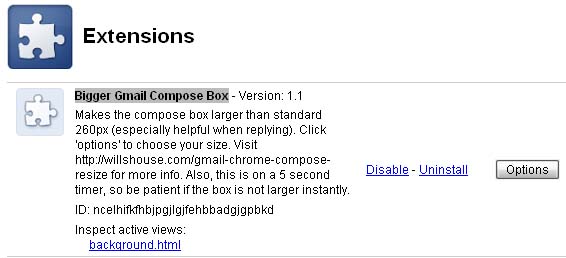
Bigger Gmail Compose Box

Details:

Have you ever wanted a larger compose box for gMail? especially when using g-mail to reply to a conversation?

I give them credit, most times when composing a new message or using it in full-screen mode, it does well. But if you’re like me, about 80% of your conversations are replies. And that is, after all, what is great about g-mail, right? The awesome threading capabilities.

So why doesn’t g-mail support a resizeable compose box? You are stuck with a fixed size, of about 260 px, even in the Chrome browser!!! A browser that is know to let you resize text boxes by default!

Well, I don’t know the answers to these questions, but they are frustrating, so I’ve written an extension for Chrome (or Chromium) which allows you to specify how big you want that box to be, and then it automatically resizes it (it make take a few seconds after you hit reply to fully grow).

Update: a newer, and more updated extension can be found here

Download the extension here:

Bigger Gmail Compose Box

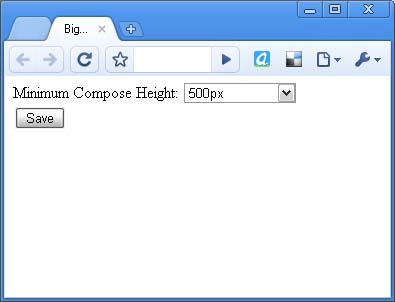
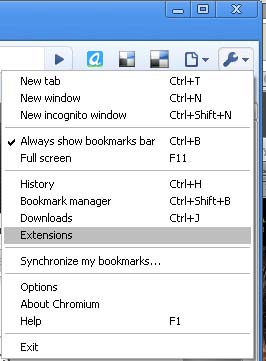
It has an options page, which you can access by going to settings (wrench icon) and then extensions. I have also added in auto-update for this extension. I’m really quite pleased with it and wanted to share.

Let me know what you think.

Having trouble? Didn’t know that Chrome allows extensions? You probably need to upgrade to the latest version. This is tested and working for the 4.x versions, so get the latest chrome now, and after downloading, you need to enable extensions.

Alternatively, if you want a one-click extension install, I suggest using Chromium (which is the development version of Chrome) because it has a lot more power and features and extensions are enabled by default.

See my posts on Downloading the latest Chromium and Chromium is not Chrome.

Also, for other great extensions, check out Chrome Extensions.


Related Posts:

  • No Related Posts
This entry was posted in Software, Tech Tips, Web Development. Bookmark the permalink.

8 Responses to gmail compose resize for chrome (extension / addon / add-on)

  1. David says:

    Uhhhh,,,, this extension doesn’t do a thing. I’ve even restarted Chrome. And yes, I waited more than 5 seconds. The extension doesn’t do crap.

  2. Guest says:

    make sure you have the latest version of chrome installed

  3. Xeno says:

    It’s not working for me either on reply input fields.

    Chrome version: 4.0.249.64 (35722) beta

  4. Will says:

    The extension works for some versions of Chrome and not others. The main problem is with g-mail being really funky. They don’t assign #id’s to their DOM elements and so it’s quite difficult to keep this extension working as they continually make little changes to g-mail. I don’t have time to update the extension right now but will do so soon.

  5. Anonymous says:

    Hey, it stopped working some while ago!
    Also, the extension managed to eat 165 MiB of memory right now.

    The easy solution is a userstyle, see: http://userstyles.org/styles/27916

  6. sergi says:

    YES!!! at last! it works perfectly. Thank you so so so much!
    Lots of people looking for that, make sure it get on the chrome – Gmail help forums!
    congrat!

  7. Hi there,

    The link for download appears to be broken. Can you re-post?

    Thanks

  8. onguarde says:

    I think I found a bug. Can someone confirm this?

    Clicking the buttons to add “cc” emails no longer works.
    The “cc” box doesn’t show up at all.

    It works fine when I disabled this extension.
    My settings for the size of the compose box, set in the extension’s options, is 1000px.

    Posted the same thing on the userstyle’s forum also.
    http://forum.userstyles.org/discussion/28922/bug-disables-the-cc-bcc-fields

Leave a Reply

Your email address will not be published. Required fields are marked *

*

You may use these HTML tags and attributes: <a href="" title=""> <abbr title=""> <acronym title=""> <b> <blockquote cite=""> <cite> <code> <del datetime=""> <em> <i> <q cite=""> <strike> <strong>