Canvas Commerce psd

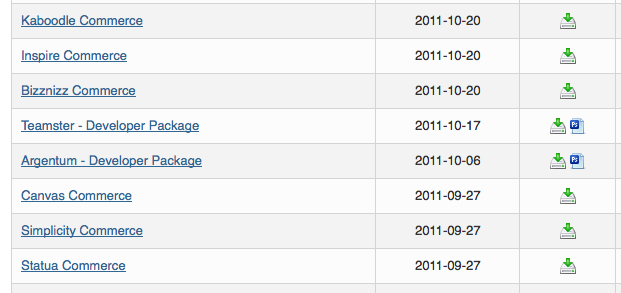
The WooTheme “Canvas Commerce” photoshop psd files is not listed in the downloads section of the WooThemes member area:

It is unclear why no PSD files are included for download, however, this is actually the case for several of the Woo Commerce themes including:

###Kaboodle Commerce PSD###
###Inspire Commerce PSD###
###Bizznizz Commerce PSD###
###Canvas Commerce PSD###
###Simplicity Commerce PSD###
###Statua Commerce PSD###

Posted in Design, Web Development | Tagged , , , , , , | Leave a comment

WordPress: Mutiple Youtube Embeds

You need to use shortcodes to have multiple WordPress embeds in a single post. See the examples below:

This won’t work:

Part 1

http:///www.youtube.com/watch?v=n7KQ4vkiNUk

Part 2

http:///www.youtube.com/watch?v=3qmtwa1yZRM

Part 3

http:///www.youtube.com/watch?v=-hidvElQ0xE

Part 4

http:///www.youtube.com/watch?v=9blgOboiGMQ

NPR’s Scott Simon: How to Tell a Story

http:///www.youtube.com/watch?v=tiX_WNdJu6w

This will work (you must use shortcodes):

Part 1

[youtubes=http://www.youtube.com/watch?v=n7KQ4vkiNUk]

Part 2

[youtubes=http://www.youtube.com/watch?v=3qmtwa1yZRM]

Part 3

[youtubes=http://www.youtube.com/watch?v=-hidvElQ0xE]

Part 4

[youtubes=http://www.youtube.com/watch?v=9blgOboiGMQ]

NPR’s Scott Simon: How to Tell a Story

[youtubes=http://www.youtube.com/watch?v=tiX_WNdJu6w]

WordPress states:

> To quickly embed a YouTube video, simply copy the video’s URL from your web browser’s address bar while viewing the video:

For more information see http:///en.support.wordpress.com/videos/youtube/

###NOTE##
To make the code compatible with this post I have changed `http://` to `http:///` in the first section and `youtube` to `youtubes` in the second section. Please change accordingly.

Posted in Tech Tips, Web Development | Tagged , , , | Leave a comment

WooThemes Graphic Designer

The WooThemes Graphic Designer team consistently does a nice job of getting their message across. They obviously have a strong background in visual communication. Take for example their simple message promoting a new product:

Posted in Design, Web Development | Tagged , , , , , | 1 Comment

WooThemes Community Population

The WooThemes Community Size was approximately 156,000 members as of February 2011.

WooThemes Community Population:

Posted in Design, Web Development | Tagged , , , , , | Leave a comment

WordPress: add_image_size (with examples)

WordPress’s `add_image_size` function can be a little tricky to master, especially understanding how the cropping and resizing works. I’ve dedicated a blog entry to explaining how the images are cropped on an image that is larger than the maximum size, and below are the results.

The WordPress documentation for the `add_image_size()` function has the following components:

###Usage###

< ?php add_image_size( $name, $width, $height, $crop ); ?>

###Parameters###

$name
(string) (required) The new image size name.
Default: None

$width
(int) (optional) The post thumbnail width in pixels.
Default: 0

$height
(int) (optional) The post thumbnail height in pixels.
Default: 0

$crop
(boolean) (optional) Crop the image or not. False – Soft proportional crop mode ; True – Hard crop mode.
Default: false

###Original Image (404w x 1587h)###
Next, the original image, which is 404w by 1587h.

add_image_size

###Soft Crop, Very Tall Height###

This results in a proportional image that is 185w by 726h. In this case the image is limited by it’s width, 185px.

add_image_size( ‘feature’, 185, 1200, false );

add_image_size

###Soft Crop, Normal Height###

This results in a proportional image that is 54w by 215h. The image is limited by the height.

add_image_size( ‘feature1’, 185, 215, false );

add_image_size

###Hard Crop, Very Tall Height###

This results in a disproportionate image which is exactly 185 x 1200, but the edges of the image are lost. This works semi-ok here but would not be good if we were uploading a logo, something with text, or a person with important features on the edges of the screen.

add_image_size( ‘feature2’, 185, 1200, true );

add_image_size

###Hard Crop, Normal Height###

This results in a disproportionate image which is exactly 185 x 215, but the edges of the image are lost. This doesn’t work well here at all and would not be good if we were uploading a logo, something with text, or a person with important features on the edges of the screen.

add_image_size( ‘feature3’, 185, 215, true );

add_image_size

###default thumbnail###

For comparison, this is the WordPress default thumbnail (except the size is set to 185 (default is 150). By default the thumbnail setting is to “Crop thumbnail to exact dimensions (normally thumbnails are proportional)”


add_image_size

add_image_size

Posted in Tech Tips, Web Development | Tagged , , , , | 4 Comments

mac: opposite of command m

> use the Command-Tab shortcut to get to the application. With the application selected press the Option key and release the Command key. One minimized window of the application will become un-minimized (if you have more than one minimized application window, you have to un-minimize the other windows the old fashioned way).

Alternatively you can use a utility like FastScripts to assign a keyboard shortcut to an Applescript file. I have set up `Cmd+Option+M` to run the following script which seems to work fine for most applications on OS X Lion:

tell application (path to frontmost application as text)
try
set miniaturized of windows to false — most apps
end try
try
set collapsed of windows to false — Finder
end try
end tell

— Hack from willshouse.com to make sure Finder really does unminimize windows
if (name of (info for (path to frontmost application)) as text) is “Finder.app” then
try
tell application “Finder”
set collapsed of windows to false — Finder
end tell
end try
end if

Posted in Mac, Tech Tips | Tagged , , , , | 2 Comments

twttrHubFrame: solved

If you’re seeing a hidden iframe with an ID `twttrHubFrame` that probably means you’re using a socialize widget such as the twitter platform’s widget. Here is an example as used by the `post-types-order` plugin for WordPress.


Posted in Social Media, Tech Tips, Web Development | Tagged , , , | Leave a comment

PlayStation Network (PSN) will be renamed Sony Entertainment Network (SEN)

Sony has just announced upcoming changes to PSN accounts: PlayStation®Network accounts will soon be renamed Sony Entertainment Network accounts.

Dear Customer,

On February 8, 2012, “PlayStation®Network accounts” will be renamed “Sony Entertainment Network accounts” or “SEN accounts”. This change will take effect at the same time as upcoming PlayStation®3 and PlayStation®Vita* system software updates. After you update the system software on your PS3™ or PS Vita , you will notice that “PlayStation®Network accounts” have been renamed “Sony Entertainment Network accounts”. This change will not affect the naming of “PlayStation®Network accounts” when viewed on a PSP® (PlayStation®Portable) system. *PlayStation®Vita will launch from 22nd February, 2012.
Continue reading

Posted in Marketing, Random, Software | Tagged , , , | 1 Comment

wget: no retries

Wget – is the non-interactive network downloader, and you can set it up to download without retrying / making any retries with the following option:

> `-t number / –tries=number`: Set number of retries to number. Specify 0 or ‘inf’ for infinite retrying. The default is to retry 20 times, with the exception of fatal errors like “connection refused” or “not found” (404), which are not retried.

It is usually also helpful to set up a timeout for requests which may take a long time:

> `-T seconds / –timeout=seconds`: Set the network timeout to seconds seconds. This is equivalent to specifying ‘–dns-timeout’, ‘–connect-timeout’, and ‘–read-timeout’, all at the same time.
> When interacting with the network, Wget can check for timeout and abort the operation if it takes too long. This prevents anomalies like hanging reads and infinite connects. The only timeout enabled by default is a 900-second read timeout. Setting a timeout to 0 disables it altogether. Unless you know what you are doing, it is best not to change the default timeout settings.

> All timeout-related options accept decimal values, as well as subsecond values. For example, ‘0.1’ seconds is a legal (though unwise) choice of timeout. Subsecond timeouts are useful for checking server response times or for testing network latency.

Posted in Web Development | Tagged , , | 1 Comment

Make YSlow work with Firefox 10

Make YSlow work with Firefox 10

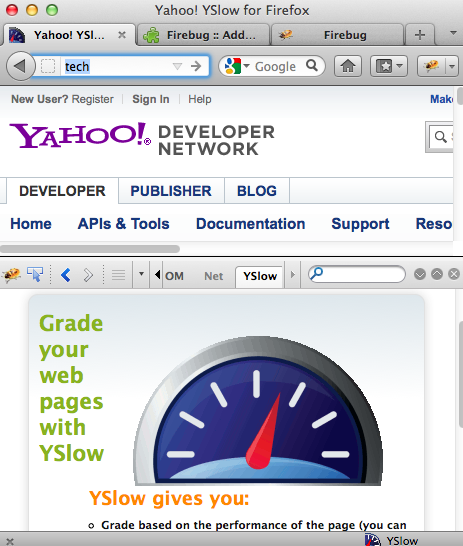
Firefox 9, Firebug, and YSlow had some compatibility issues which caused YSlow not to work for many users. The good news is that the Firebug, and YSlow extensions have been updated and now if you are using `Firebug 1.9.1` and `YSlow 3.0.9` then YSlow will work “Out of the Box” with Firefox 10.

If you had these extensions previously disabled make sure re-enable them and you should be good to go.

Firebug 1.9.1 and YSlow 3.0.9

Posted in Mac, Software, Tech Tips, Web Development | Tagged , , | 1 Comment