Remove WooCommerce Generator Tag

If you would like to remove the Remove WooCommerce Generator Tag from the `` section of your WordPress installation, you can add the following line somewhere, perhaps in your wordpress `functions.php` file:

`remove_action(‘wp_head’, array($GLOBALS[‘woocommerce’],’generator’));`

I’ve updated the code to work with the most recent version of Woo Commerce, try adding this to the `functions.php` file of your WordPress theme:

function remove_woo_commerce_generator_tag()
{
remove_action(‘wp_head’,array($GLOBALS[‘woocommerce’], ‘generator’));
}
add_action(‘get_header’,’remove_woo_commerce_generator_tag’);

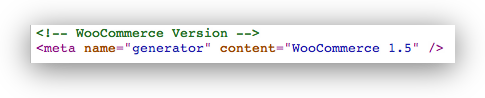
That will prevent the following line from being shown in your HTML code:


Remove WooCommerce Generator Tag

Posted in Security, Tech Tips, Web Development | Tagged , , , , | 8 Comments

Google Thinks You’re Awesome

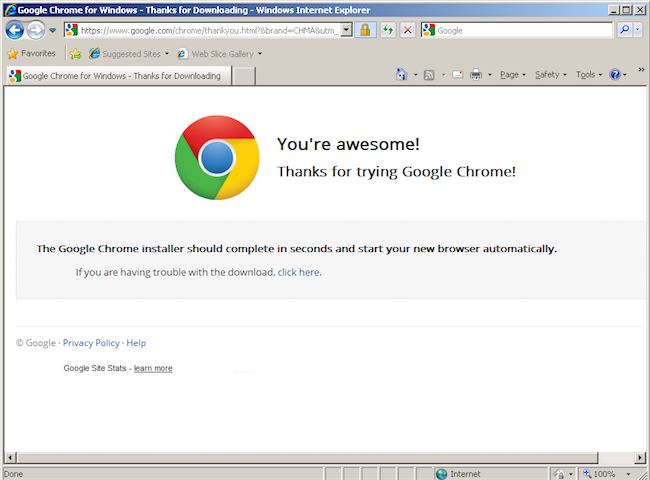
Google Thinks You’re Awesome if you are using Internet Explorer and download Google Chrome:

I can’t say that I disagree.

Posted in Marketing, Software | Tagged , , , | 1 Comment

iPower: The server encountered an unexpected condition which prevented it from fulfilling the request.

iPower: The server encountered an unexpected condition which prevented it from fulfilling the request.

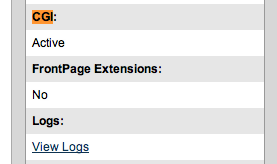
If you’re getting this error on iPower you need to enable CGI / scripts. Sometimes your account will show you that this is enabled, even if it is not. Contact iPower support to get them to resolve it for you.

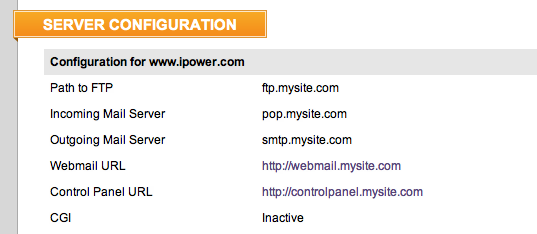
Even if in your control panel homepage CGI / PHP is showing up as active, click on the server configuration tab and you probably will see that CGI is in fact inactive:

Posted in Server Admin, Server Administration, Web Development | Tagged , , , , , , | Leave a comment

Install WordPress on Linux in 5 Seconds

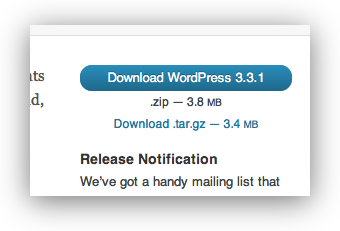
WordPress is available on WordPress.org in two formats, `.zip` and `.tar.gz`:

I wanted an option to download and extract WordPress as easily as possible. I had looked for a way to do this with the `zip` format but apparently

> Archives read from standard input are not yet supported, except with funzip (and then only the first member of the archive can be extracted). (source

So, my solution was to use WordPress’ `latest.tar.gz` file and pipe it (`stdin/stdout`). Running the following command will create a `wordpress` folder in your current working directory with all files:

wget -O – http://wordpress.org/latest.tar.gz | gzip -c -d | tar -x

Notes:

wget -O – //send output to stdout, use – before the URL
gzip -c -d //read from stdin, decompress
tar -x // extract, could probably also use -v to verify

Posted in Linux, Tech Tips, Web Development | Tagged , , , , , , , , , , | Leave a comment

14 Most Popular Woo Themes


Most Popular Woo Themes

Backstage

A powerful niche theme design for musicians and artists showcasing their media, upcoming shows and music using hugely flexible custom widgets and audio players. This beautifully crafted layout was designed by Elliot Jay Stocks and boasts 7 alternate styles.

Live demo – Read more

Most Popular Woo Themes

Biznizz

Built on WooThemes own winning formula, Biznizz will give your website a fresh new look. Its integrated slider and custom homepage layout, in addition to the optional portfolio page template, makes Biznizz a great candidate for your next business website.

Live demo – Read more

Most Popular Woo Themes

Caffeinated

This personal portfolio theme by Ryan Downie was originally designed for his own personal use – fueled by his passion for Coffee, Red Bull and lunchtime pot of noodles according to his Twitter stream. It’s perfect for anyone wanting a bold design to show off their work.

Live demo – Read more

Most Popular Woo Themes

City Guide

This theme was developed to cater for directory-based WordPress sites. For example, a guide to a city with shops, restaurants and other places of interest all archived in posts with geo-tags, custom content about the locations, and well presented in this killer theme designed by Sam Brown.

Live demo – Read more

Most Popular Woo Themes

Continuum

A Magazine theme which features a custom homepage, custom typography and some extra custom widgets, all to help your news/magazine website get a stylish and functional look. Designed by Simon Collison.

Live demo – Read more

Most Popular Woo Themes

Crisp

Designed by Tyler Galpin, and boasting all-new tumblog functionality with a quick publishing form on the dashboard Crisp is perfect for lazy bloggers who want a professional, slick looking site with Tumblr-like ease-of-use.

Live demo – Read more

Most Popular Woo Themes

Elefolio

Combines easy Tumblog publishing and a Portfolio to showcase your work and posts. The portfolio uses custom post types and can also stream from your Dribbble account. It will impress any visitor with its simple yet detailed look.

Live demo – Read more

Most Popular Woo Themes

Fresh News

This is one of WooThemes’ oldest and best selling themes, which has now been completely overhauled in version 3.0 to compete with the best themes of today. In the updated version you’ll find updated options to control the look, layout and fonts, and also some new features like a featured post slider.

Live demo – Read more

Most Popular Free WooThemes

alt=”Popular Woo Themes  Typebased

A very beautiful theme which manages to create a bond between personal and professional having 5 different color schemes and a great list of customization options. The theme makes the advertisements integration very easy and fast.

Popular Woo Themes alt=”Popular Woo Themes  The Original Premium News

This is perfect for any type of website containing a great amount of content (magazine style) originally created for news websites allowing users to advertise.

Popular Woo Themes alt=”Popular Woo Themes  The Morning After

Probably the most popular theme available at the WordPress directory. It has over 100,000 downloads and it manages to impress with minimalist style and professionalism.

Popular Woo Themes

alt=”Popular Woo Themes  Skeptical

Very easy to customize allowing you to place content in places you wouldn’t believe you can. The theme is very futuristic and great for a personal blog use.

Popular Woo Themes

alt=”Popular Woo Themes  Mainstream

Is a very colorful WordPress theme containing lots of features including widgetized sidebar and some custom build features for it.

Popular Woo Themes

alt=”Popular Woo Themes  Placeholder

Very minimalist theme conceived especially to serve the need of informing people about your website launch and get in touch with them.

Popular Woo Themes

Keep in mind that all themes created by WooThemes are fully functional with the latest version of WordPress and they are also including widget-ready areas in sidebars, ready for advertising and also come with a large variety of customizations and more than 2 css styles for each of them just so you can impress your website visitors with diversity.

Posted in Design, Tech Tips, Web Development | Tagged , , , , | 1 Comment

MySQL UPDATE JOIN

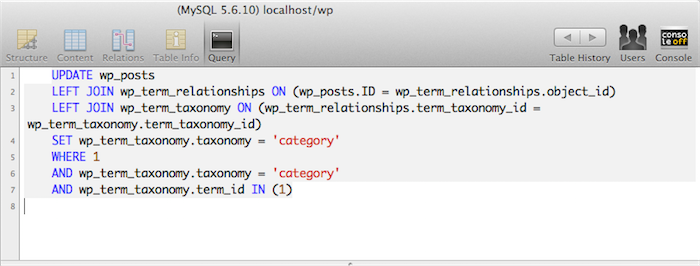
Here is a working example of how to do an UPDATE JOIN with MySQL:

###MySql UPDATE LEFT / CENTER / RIGHT JOIN Example###

This is the correct way to update a table when using a `JOIN`. They key is that the `SET` needs to come after the `JOIN`.

UPDATE wp_posts
LEFT JOIN wp_term_relationships ON (wp_posts.ID = wp_term_relationships.object_id)
LEFT JOIN wp_term_taxonomy ON (wp_term_relationships.term_taxonomy_id = wp_term_taxonomy.term_taxonomy_id)
SET wp_term_taxonomy.taxonomy = ‘category’
WHERE 1
AND wp_term_taxonomy.taxonomy = ‘category’
AND wp_term_taxonomy.term_id IN (1)

This WILL NOT WORK because the `SET` is in the wrong place:

UPDATE wp_posts
SET wp_term_taxonomy.taxonomy = ‘category’
LEFT JOIN wp_term_relationships ON (wp_posts.ID = wp_term_relationships.object_id)
LEFT JOIN wp_term_taxonomy ON (wp_term_relationships.term_taxonomy_id = wp_term_taxonomy.term_taxonomy_id)
WHERE 1
AND wp_term_taxonomy.taxonomy = ‘category’
AND wp_term_taxonomy.term_id IN (1)

MySql UPDATE JOIN Example

Posted in Tech Tips, Web Development | Tagged , , , , | Leave a comment

WordPress: SQL to get all Categories

If you’re trying to get all categories in WordPress with a real, raw, mysql sql statement, this is the type of query you can use:

SELECT *
FROM wp_term_relationships
LEFT JOIN wp_term_taxonomy
ON (wp_term_relationships.term_taxonomy_id = wp_term_taxonomy.term_taxonomy_id)
WHERE wp_term_taxonomy.taxonomy = ‘category’
GROUP BY wp_term_taxonomy.term_id

This is how you can get posts of a certain category / taxonomy. I have a few extra lines commented out that could also be used:

SELECT *
FROM wp_posts
LEFT JOIN wp_term_relationships ON (wp_posts.ID = wp_term_relationships.object_id)
LEFT JOIN wp_term_taxonomy ON (wp_term_relationships.term_taxonomy_id = wp_term_taxonomy.term_taxonomy_id)
WHERE 1
#AND wp_term_taxonomy.taxonomy = ‘category’
AND wp_term_taxonomy.term_id IN (13)
#AND wp_term_taxonomy.term_id IN (1,2,3,4,5,6,7)
GROUP BY wp_posts.ID
ORDER BY ID

Update: Omar asks:

> cool.. but how can I get the NAME of those categories ??

Well, try this:

SELECT *
FROM wp_term_relationships
LEFT JOIN wp_term_taxonomy
ON (wp_term_relationships.term_taxonomy_id = wp_term_taxonomy.term_taxonomy_id)
LEFT JOIN wp_terms on wp_term_taxonomy.term_taxonomy_id = wp_terms.term_id
WHERE wp_term_taxonomy.taxonomy = ‘category’
GROUP BY wp_term_taxonomy.term_id

or just for the names:

SELECT wp_terms.name
FROM wp_term_relationships
LEFT JOIN wp_term_taxonomy
ON (wp_term_relationships.term_taxonomy_id = wp_term_taxonomy.term_taxonomy_id)
LEFT JOIN wp_terms on wp_term_taxonomy.term_taxonomy_id = wp_terms.term_id
WHERE wp_term_taxonomy.taxonomy = ‘category’
GROUP BY wp_term_taxonomy.term_id

Posted in Social Media, Tech Tips, Web Development | Tagged , , , , , | 8 Comments

Applescript: Check Application Is Running

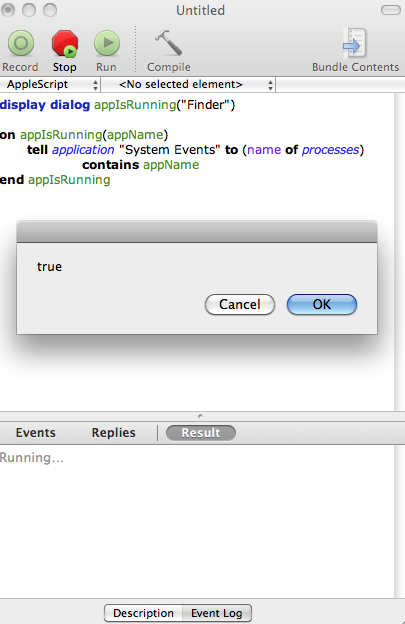
Below is my Applescript example of how to check if an application is running, such as Finder.app, VLC.app, itunes.app, or something along those lines. Quite often I need to check if an application is running as part of my applescript, and so I use this little function / subroutine in applescript to test if the application is running:

on appIsRunning(appName)
tell application “System Events” to (name of processes) contains appName
end appIsRunning

Example usage:

display dialog appIsRunning(“Finder”)

The above apple script example will show “true” in a popup dialog.

Posted in Mac, Software, Tech Tips | Tagged , , , , , , , , | 1 Comment

OS X Lion: Printing Multiple Pages per Sheet

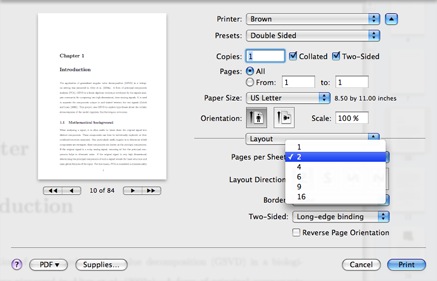
I’ve been disappointed that the preview in the OS X Lion does not show multiple pages per sheet like Leopard and Snow Leopard did. I often do this to conserve paper when I’m printing lecture notes. With Leopard, I’m often doing this blind and get things out of order. Preview or Acrobat provide this functionality, but in Preview the functionality is hidden under the “Preview / Layout” dropdown option:

  1. To print multiple pages per sheet, first select the Layout option from the Print dialog. It is part of the menu marked “Preview.”
  2. Then, choose the number of pages which should be printed on one side of a single sheet of paper.
  3. With this example, there will be two pages on each side, for a total of four pages on a single sheet of paper when duplexed.
  4. You can also optionally set the layout direction, and whether a border should be printed around each individual page.
Posted in Mac, Software, Tech Tips | Tagged , , , , , , | 3 Comments

Complete List of Woo Commerce Themes

  • Sentient
  • Whitelight
  • Whitelight Commerce
  • Unsigned
  • Shelflife
  • Olya
  • Sliding
  • Beveled
  • Buro Commerce
  • Empire Commerce
  • Briefed Commerce
  • Wikeasi
  • Currents
  • Emporium
  • Kaboodle Commerce
  • Inspire Commerce
  • Bizznizz Commerce
  • Teamster
  • Argentum
  • Canvas Commerce
  • Simplicity Commerce
  • Statua Commerce
  • Woostore
  • Coquette
  • Buro
  • Announcement
  • Empire
  • SupportPress
  • Editorial
  • Statua
  • Briefed
  • FaultPress
  • Kaboodle
  • Saving Grace
  • Premiere
  • Simplicity
  • Delicious Magazine
  • Listings
  • BoldNews
  • Biznizz
  • Auld
  • Listings
  • Elefolio
  • Chapters
  • Continuum
  • Diner
  • Caffeinated
  • Crisp
  • Sealight
  • Unite
  • Estate
  • Coda
  • Inspire
  • Apz
  • Spectrum
  • Diarise
  • Boast
  • Retreat
  • City Guide
  • Slanted
  • Cinch
  • Canvas
  • Postcard
  • Delegate
  • MyStream
  • Optimize
  • Backstage
  • SophisticatedFolio
  • Digital Farm
  • Headlines
  • Royalle
  • f0101
  • Exposure
  • Therapy
  • Daily Edition
  • Object
  • Antisocial
  • Coffee Break
  • Mortar
  • Big Easy
  • Groovy Photo
  • Groovy Blog
  • Feature Pitch
  • Suit and Tie
  • The Journal
  • myweblog
  • Aperture
  • Bloggingstream
  • The Station
  • Groovy Video
  • Productum
  • Newsport
  • Cushy
  • WooTube
  • Foreword Thinking
  • Geometric
  • Abstract
  • Busy Bee
  • Gotham News
  • THiCK
  • Over Easy
  • Ambience
  • Open Air
  • Fresh Folio
  • Paper Cut
  • VibrantCMS
  • ProudFolio
  • Fresh News
  • Live Wire
  • Gazette
  • Flash News
  • NewsPress
Posted in Design, Web Development | Tagged , , , , | 1 Comment