How to Watch USB Movies on Roku

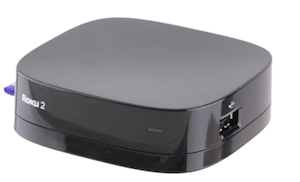
Roku USB MoviesHow to Watch USB Movies on RokuThe Roku 2 XS allows you to watch your own movies right from a USB stick. Here’s how you can get it working:

  1. Make sure you have a movie in an appropriate format, mainly H.264 or WMV/ASF
  2. Make sure the USB stick is formatted properly, FAT16, FAT32, HFS+, or NTFS file systems are noted to work.
  3. Install the USB Device “Channel” through the channel store – it is free.
  4. Visit the USB Channel on your Roku XS device
  5. If there is more than one USB device showing up check them both. Voila!

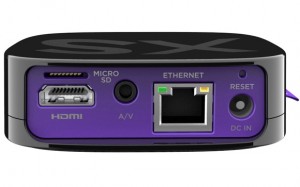
Now you can watch movies directly from a USB jump drive / thumb drive on your Roku. Remember that the Micro SD card slot is only used as storage and you can’t watch movies from it.

Posted in Marketing, Tech Tips | Tagged , , , , , | 2 Comments

Roku 2 XS USB Video Formats

roku-2-xs-usb-video-formatsThe Roku 2 XS supports video, audio, and photo playback in the following formats:

  • Video: MKV using H.264, MP4/M4V/MOV using H.264 (and MPEG4), WMV/ASF using WMV9 or VC-1.
  • Audio: AAC, MP3, or Dolby Digital/DTS Passthru
  • Photos: JPEG & PNG

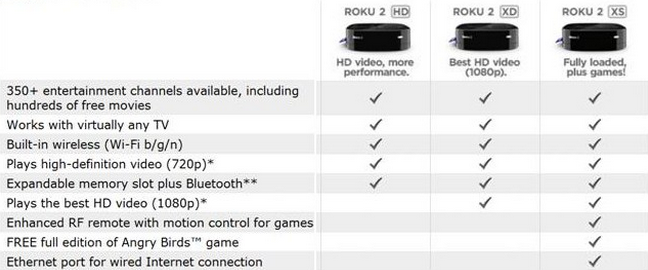
These have to be loaded using the USB port, as the Micro SD slot is only for additional storage. Of the Roku 2 series boxes only the Roku 2 XS supports media playback of your own external media.

Also please note that for “security reasons” you can’t move a microSD card from one Roku 2 player to another without re-formatting it.

Video Formats Roku 2 XS USB

Posted in Tech Tips | Tagged , , , , | Leave a comment

nagios check_dns / check_ip example

Need to monitor an IP address / DNS entry with Nagios? Nagios has a plugin called check_dns just for that.

The check commands are defined in this file: `/etc/nagios-plugins/config/dns.cfg`

# ‘check_dns’ command definition
define command{
command_name check_dns
command_line /usr/lib/nagios/plugins/check_dns -H www.google.com -s ‘$HOSTADDRESS$’
}

# ‘check_dig’ command definition
define command{
command_name check_dig
command_line /usr/lib/nagios/plugins/check_dig -H ‘$HOSTADDRESS$’ -l ‘$ARG1$’
}

here is an alternate version I wrote to check the IP of a host, I could have used `check_ip` because I don’t think that command is taken, but instead I used `my_check_dns`:

#my_check_dns command, checks to make sure a hostname resolved to a specified IP address:

define command {
command_name my_check_dns
command_line /usr/lib/nagios/plugins/check_dns -H $ARG1$ -a $ARG2$
}

this is how it would be implemented in a service:

define service{
use generic-service ; Name of service template to use
host_name mysite.com
service_description check dns
check_command my_check_dns!www.mysite.com!123.456.78.90
}

Man Page:

check_dns v1.4.14 (nagios-plugins 1.4.14)
Copyright (c) 1999 Ethan Galstad
Copyright (c) 2000-2008 Nagios Plugin Development Team

This plugin uses the nslookup program to obtain the IP address for the given host/domain query.
An optional DNS server to use may be specified.
If no DNS server is specified, the default server(s) specified in /etc/resolv.conf will be used.

Usage:check_dns -H host [-s server] [-a expected-address] [-A] [-t timeout] [-w warn] [-c crit]

Options:
-h, –help
Print detailed help screen
-V, –version
Print version information
-H, –hostname=HOST
The name or address you want to query
-s, –server=HOST
Optional DNS server you want to use for the lookup
-a, –expected-address=IP-ADDRESS|HOST
Optional IP-ADDRESS you expect the DNS server to return. HOST must end with
a dot (.). This option can be repeated multiple times (Returns OK if any
value match). If multiple addresses are returned at once, you have to match
the whole string of addresses separated with commas (sorted alphabetically).
-A, –expect-authority
Optionally expect the DNS server to be authoritative for the lookup
-w, –warning=seconds
Return warning if elapsed time exceeds value. Default off
-c, –critical=seconds
Return critical if elapsed time exceeds value. Default off
-t, –timeout=INTEGER
Seconds before connection times out (default: 10)

Send email to [email protected] if you have questions
regarding use of this software. To submit patches or suggest improvements,
send email to [email protected]

Posted in Security, Server Admin | Tagged , , , , | 1 Comment

Disable Dock OS X Mavericks

I use Quicksilver for almost everything and really hate that the dock always seems to be getting in my way. I was looking for a way to remove it, and found the following lines of code. There are some apps, like DockKiller, which can be a little buggy, but what I’ve found is that using the following commands will (for me) make the Dock small enough and move it into a place where it doesn’t pop up, and so this solution was the one that worked best for me.

To implement this solution, open a terminal and run the following commands:

// makes the dock icon size really really small
defaults write com.apple.dock tilesize -int 1

// puts the dock on the bottom of the screen
// other values are left and right
defaults write com.apple.dock orientation -string bottom

// puts the dock on the left side
// other values are center and end
defaults write com.apple.dock pinning -string start

// restarts the dock so the changes take effect
killall Dock

Here is a screenshot of the dock – this is actual size, a crop from the bottom left corner of my screen :)

Remove Dock on Mac OS X Lion

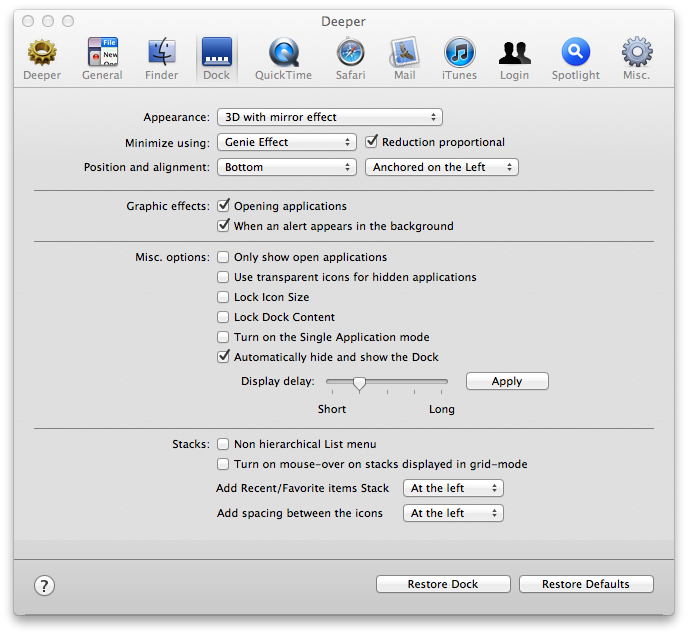
If you’re looking for general dock preferences you can also check out the Deeper which exposes a lot of these options in a GUI manner:

Remove Dock Permanently Hide On Mac Os X Lion

### How do I get to the Trash can now?

I’ve written a little applescript which helps me pull up the trash:

on run
tell application “Finder”
open trash
activate
end tell
end run

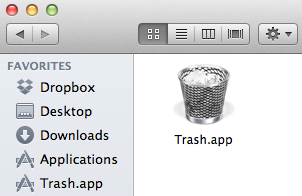
You can then save that with a trash icon and put it on your desktop, in your sidebar, etc:

Remove Dock Permanently Hide On Mac Os X

You can also download my “Trash.app” script

Posted in Mac, Software, Tech Tips | Tagged , , , | 5 Comments

Mac OS X Dock Preference Settings (secrets)

Mac OS X Dock Preference Settings (secrets)###Animate launch###
`defaults write com.apple.dock launchanim -boolean`
###Expose minimizes desktop###
`defaults write com.apple.dock wvous-olddesktop -boolean`
###Prevent changes to position###
`defaults write com.apple.dock position-immutable -boolean`
###Magnification###
`defaults write com.apple.dock magnification -boolean`
###Show Expose corners###
`defaults write com.apple.dock wvous-showcorners -boolean`
###Prevent changes to min-effect preference###
`defaults write com.apple.dock min-effect-immutable -boolean`
###Ripple when placing widgets###
`defaults write com.apple.dock disable-ripple -boolean-neg`
###Screen Edge Position###
defaults write com.apple.dock orientation -string left
defaults write com.apple.dock orientation -string bottom
defaults write com.apple.dock orientation -string right
###Dock Appearance###
`defaults write com.apple.dock no-glass -float`
###Prevent changes to min-in-place preference###
`defaults write com.apple.dock min-in-place-immutable -boolean`
###Arrow key wraps###
`defaults write com.apple.dock workspaces-wrap-arrows -boolean`
###Dock pinning###
`defaults write com.apple.dock pinning -string`
###Bounce Applications###
`defaults write com.apple.dock no-bouncing -boolean-neg`
###Show “Quit” menu item###
`defaults write com.apple.dock QuitFinder -boolean`
###Switch spaces when using Command-Tab###
`defaults write com.apple.dock workspaces-auto-swoosh -boolean`
###Highlight the arrow of the foremost application###
`defaults write com.apple.dock showforeground -`
###wvous-float-style###
`defaults write com.apple.dock wvous-float-style -`
###Dim hidden apps###
`defaults write com.apple.dock showhidden -boolean`
###Prevent changes to Dock contents###
`defaults write com.apple.dock contents-immutable -boolean`
###Show only running applications###
`defaults write com.apple.dock static-only -boolean`
###Hot Corner: Top left###
`defaults write com.apple.dock wvous-tl-corner -string`
###Show shadow###
`defaults write com.apple.dock showshadow -boolean`
###Always show trash as empty###
`defaults write com.apple.dock trash-full -boolean`
###Prevent changes to Dock size###
`defaults write com.apple.dock size-immutable -boolean`
###Enable single application mode###
`defaults write com.apple.dock single-app -boolean`
###Hot Corner: Top right###
`defaults write com.apple.dock wvous-tr-corner -string`
###Autohide###
`defaults write com.apple.dock autohide -boolean`
###Show floating Expose button###
`defaults write com.apple.dock wvous-floater -boolean`
###Prevent changes to autohide preference###
`defaults write com.apple.dock autohide-immutable -boolean`
###minimize-128###
`defaults write com.apple.dock minimize-128 -`
###Minimize effect###
`defaults write com.apple.dock mineffect -string`
###Highlight stack items on hover###
`defaults write com.apple.dock mouse-over-hilte-stack -boolean`
###tile-inset###
`defaults write com.apple.dock tile-inset -integer`
###Show all files in Dock menus###
`defaults write com.apple.dock AppleShowAllFiles -boolean`
###Prevent changes to magnification preference###
`defaults write com.apple.dock magnify-immutable -boolean`
###Hot Corner: Bottom left###
`defaults write com.apple.dock wvous-bl-corner -string`
###Enable spring load on all Dock items###
`defaults write com.apple.dock enable-spring-load-actions-on-all-items -boolean`
###Hot Corner: Bottom right###
`defaults write com.apple.dock wvous-br-corner -string`
###Show Recent Applications as Stack###
`defaults write com.apple.dock persistent-others -array-add`
###Show favorite volumes stack###
`defaults write com.apple.dock persistent-others -array-add`
###Add Recents / Favorite Stack to Right Side###
`defaults write com.apple.dock persistent-others -array-add-multiple`
###Delay for dragging windows between spaces###
`defaults write com.apple.dock wordspaces-edge-display -float`
###Add Recents / Favorite Stack to Left Side###
`defaults write com.apple.dock persistent-apps -array-add-multiple`
###Add separator to right side###
`defaults write com.apple.dock persistent-others -array-add-multiple`
###Show Recent Documents as Stack###
`defaults write com.apple.dock persistent-others -array-add`
###Show Recent Servers as Stack###
`defaults write com.apple.dock persistent-others -array-add`
###Add separator to left side###
`defaults write com.apple.dock persistent-apps -array-add-multiple`
###Show Icons of hidden Applications semitransparent###
`defaults write com.apple.dock showhidden -boolean`
###Pinning###
`defaults write com.apple.dock pinning -string`
###Single App Mode###
`defaults write com.apple.dock single-app -boolean`
###Prevent changes to Dock contents for all users###
`defaults write /Library/Preferences/com.apple.dock contents-immutable -boolean`
###Auto Hide Other Apps on Fast User Switch###
`defaults write com.apple.dock single-app -boolean`
###Trash Full###
`defaults write com.apple.dock trash-full -boolean`
###Click and hold on application invokes Exposé###
`defaults write com.apple.dock show-expose-menus -boolean`
###Highlight stack items on hover (10.6)###
`defaults write com.apple.dock mouse-over-hilite-stack -boolean`
###Enable New List View in Stacks###
`defaults write com.apple.dock use-new-list-stack -boolean`
###Tile size###
`defaults write com.apple.dock tilesize -integer`
###Magnified icon size###
`??`
###Edge dragging delay###
`defaults write com.apple.dock workspaces-edge-delay -float`
###Show other spaces’ windows in Expose ###
`??`
###disable multi-display swoosh animations###
`defaults write com.apple.dock workspaces-swoosh-animation-off -boolean-neg`
###Disable Expose###
`defaults write com.apple.dock mcx-expose-disabled -boolean`
###Always show the iTunes icon in notifications###
`defaults write com.apple.dock notification-always-show-image -boolean`
###Enable iTunes pop-up notifications###
`defaults write com.apple.dock itunes-notifications -boolean`

Posted in Mac, Software, Tech Opinion | Tagged , , , , , | 1 Comment

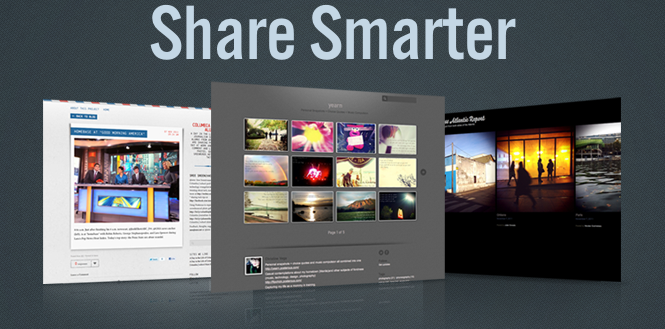
Posterous Spaces

Looks like Posterous is now owned by twitter. Seems this happened right now in March 2012. I wonder what that means for the future of the micro / blogging site. Their main feature (the one I thought set them apart) was being able to email photos and information which was then posted in a nice format.

Posterous Spaces

Posted in Social Media, Tech Opinion | Tagged | Leave a comment

Facebook Cover Photo Dimensions

Facebook has recently upgraded their pages and now allows you to add a Cover Photo – but what size is the ideal dimensions and what should the correct aspect ratio for the Cover Photos be?

Width: 851px
Height: 315px
72dpi for internet / 300 for print
RGB Color Scheme

Cover Photo Dimensions (Width and Height)

Just remember that the resolution dimensions of the timeline cover for Facebook is 851×315 pixels (width and height).

Download a sample image you can use as a template for your Facebook Cover Photo.

Get the Facebook Cover Photo Dimensions Photoshop Template

Download a template for the Facebook Cover Photo Dimensions, either as a JPG or a Photoshop File. (Right click and save the JPG, it will be rendered smaller than actual size in the web browser, but after you download it you will see it is the exact specified size for the Facebook Cover Photo)

Facebook Cover Photo Dimensions Template

Get the Facebook Cover Photo Dimensions Photoshop Template

High resolution background texture from here

Posted in Social Media | Tagged , , , , | 2 Comments

How to Reset WP to Twitter

The WordPress plugin *WP to Twitter* “posts a Twitter status update when you update your WordPress blog or post to your blogroll, using your chosen URL shortening service. Rich in features for customizing and promoting your Tweets.”

You can activate the plugin and then set all the options, but if you are having trouble the plugin offers no way to unset all of the options associated with it.

You can use the following sql / mySQL command to remove all of the options generated by this plugin. Use this at your own risk, and of course create a backup of your database before attempting this.

delete from
wp_options
where option_name in
(‘app_consumer_key’,
‘app_consumer_secret’,
‘bitlyapi’,
‘bitlylogin’,
‘comment-published-text’,
‘comment-published-update’,
‘disable_oauth_notice’,
‘disable_twitter_failure’,
‘disable_url_failure’,
‘jd_date_format’,
‘jd_donations’,
‘jd_dynamic_analytics’,
‘jd_individual_twitter_users’,
‘jd_keyword_format’,
‘jd_last_tweet’,
‘jd_max_characters’,
‘jd_max_tags’,
‘jd_post_excerpt’,
‘jd_replace_character’,
‘jd_shortener’,
‘jd_status_message’,
‘jd_strip_nonan’,
‘jd_tweet_default’,
‘jd_twit_append’,
‘jd_twit_blogroll’,
‘jd_twit_custom_url’,
‘jd_twit_prepend’,
‘jd_twit_remote’,
‘limit_categories’,
‘newlink-published-text’,
‘oauth_token’,
‘oauth_token_secret’,
‘suprapi’,
‘suprlogin’,
‘tweet_categories’,
‘twitter-analytics-campaign’,
‘twitterInitialised’,
‘use-twitter-analytics’,
‘use_dynamic_analytics’,
‘use_tags_as_hashtags’,
‘wp_bitly_error’,
‘wp_debug_oauth’,
‘wp_supr_error’,
‘wp_to_twitter_version’,
‘wp_twitter_failure’,
‘wp_url_failure’,
‘wpt_inline_edits’,
‘wpt_post_types’,
‘wtt_oauth_hash’,
‘wtt_twitter_username’,
‘wtt_user_permissions’,
‘yourlsapi’,
‘yourlslogin’,
‘yourlspath’,
‘yourlsurl’)

Posted in Social Media, Tech Tips, Web Development | Tagged , , , | Leave a comment

Add Coupon To Coupon Cabin

If you are a merchant or contributing individual and want to submit a coupon to the couponcabin.com webiste, follow these instructions:

  1. Visit couponcabin.com
  2. Click on account
  3. Log in
  4. Click on submit coupon
  5. Voila!

Alternatively you can visit the page at http://www.couponcabin.com/stores/submit-coupon/

Posted in Social Media, Tech Tips | Tagged , , | 2 Comments

Woo Themes and Affiliate Link Structure

Recently received an error from Woo. It’s below, and it has some unique insights to how the database and affiliate tracking is done.


Database Error

Database Error

A database error occurred while performing the requested procedure. Please review the database error below for more information.

system/libraries/drivers/Database/Mysql.php [371]:

There was an SQL error: Duplicate entry '9802422' for key 1 - INSERT INTO `wm_affclick` (`aff_id`, `url`, `remote_addr`, `referrer`, `woo_product`, `is_unique`) VALUES ('123456', 'http://www.woothemes.com/extension/google-product-feed/', '123.45.67.89', NULL, '', 0)

Stack Trace

  • system/libraries/drivers/Database/Mysql.php [99]:
    Mysql_Result->__construct(  )
  • system/libraries/Database.php [259]:
    Database_Mysql_Driver->query( INSERT INTO `wm_affclick` (`aff_id`, `url`, `remote_addr`, `referrer`, `woo_product`, `is_unique`) VALUES ('123456', 'http://www.woothemes.com/extension/google-product-feed/', '123.45.67.89', NULL, '', 0) )
  • system/libraries/Database.php [962]:
    Database_Core->query( INSERT INTO `wm_affclick` (`aff_id`, `url`, `remote_addr`, `referrer`, `woo_product`, `is_unique`) VALUES ('123456', 'http://www.woothemes.com/extension/google-product-feed/', '123.45.67.89', NULL, '', 0) )
  • application/models/affiliatestats.php [138]:
    Database_Core->insert( wm_affclick, Array
    (
        [aff_id] => 123456
        [url] => http://www.woothemes.com/extension/google-product-feed/
        [remote_addr] => 123.45.67.89
        [referrer] => 
        [woo_product] => 
        [is_unique] => 0
    )
     )
  • application/helpers/log.php [95]:
    AffiliateStats_Model->create( Array
    (
        [aff_id] => 123456
        [url] => http://www.woothemes.com/extension/google-product-feed/
        [remote_addr] => 123.45.67.89
        [referrer] => 
        [woo_product] => 
        [is_unique] => 0
    )
     )
  • application/controllers/go.php [124]:
    log_Core->add_affclick( 123456, http://www.woothemes.com/extension/google-product-feed/ )
  • Go_Controller->index(  )
  • system/core/Kohana.php [291]:
    ReflectionMethod->invokeArgs( Go_Controller Object
    (
        [uri] => URI Object
            (
            )
    
        [input] => Input Object
            (
                [use_xss_clean:protected] => 1
                [magic_quotes_gpc:protected] => 1
                [ip_address] => 
            )
    
        [session] => Session Object
            (
                [input:protected] => Input Object
                    (
                        [use_xss_clean:protected] => 1
                        [magic_quotes_gpc:protected] => 1
                        [ip_address] => 
                    )
    
            )
    
    )
     )
  • Kohana::instance(  )
  • system/core/Event.php [209]:
    call_user_func( Array
    (
        [0] => Kohana
        [1] => instance
    )
     )
  • system/core/Bootstrap.php [55]:
    Event::run( system.execute )
  • index.php [106]:
    require( system/core/Bootstrap.php )

Loaded in 0.0088 seconds, using 1.13MB of memory. Generated by Kohana v2.3.4.

Posted in Server Admin, Web Development | Tagged , , , | 1 Comment