Heredocs and Nowdocs in PHP

A here document (also called a here-document, a heredoc, a here-string or a here-script) is a way of specifying a string literal in command line shells including all the Unix shells (sh, csh, ksh, Bash and zsh) and the Windows PowerShell and in programming or scripting languages such as Perl, PHP, Python and Ruby. It preserves the line breaks and other whitespace (including indentation) in the text. Some languages allow variable substitution and command substitution inside the string.

The general syntax is << followed by a delimiting identifier, followed, starting on the next line, by the text to be quoted, and then closed by the same identifier on its own line. Under the Unix shells, here documents are generally used as a way of providing input to commands.

from Wikipedia

Example Heredoc Syntax

<?php
$str = <<<EOD
Example of string
spanning multiple lines
using heredoc syntax.
EOD;

/* More complex example, with variables. */
class foo
{
var $foo;
var $bar;

function foo()
{
$this->foo = ‘Foo’;
$this->bar = array(‘Bar1’, ‘Bar2’, ‘Bar3’);
}
}

$foo = new foo();
$name = ‘MyName’;

echo <<<EOT
My name is “$name”. I am printing some $foo->foo.
Now, I am printing some {$foo->bar[1]}.
This should print a capital ‘A’: \x41
EOT;
?>

NowDocs

Nowdocs are to single-quoted strings what heredocs are to double-quoted strings. A nowdoc is specified similarly to a heredoc, but no parsing is done inside a nowdoc. The construct is ideal for embedding PHP code or other large blocks of text without the need for escaping. It shares some features in common with the SGML <![CDATA[ ]]> construct, in that it declares a block of text which is not for parsing.

A nowdoc is identified with the same <<< seqeuence used for heredocs, but the identifier which follows is enclosed in single quotes, e.g. <<<‘EOT’. All the rules for heredoc identifiers also apply to nowdoc identifiers, especially those regarding the appearance of the closing identifier.

<?php
$str = <<<'EOD'
Example of string
spanning multiple lines
using nowdoc syntax.
EOD;

/* More complex example, with variables. */
class foo
{
public $foo;
public $bar;

function foo()
{
$this->foo = ‘Foo’;
$this->bar = array(‘Bar1’, ‘Bar2’, ‘Bar3’);
}
}

$foo = new foo();
$name = ‘MyName’;

echo <<<‘EOT’
My name is “$name”. I am printing some $foo->foo.
Now, I am printing some {$foo->bar[1]}.
This should not print a capital ‘A’: \x41
EOT;
?>

from PHP.net

Posted in Tech Tips, Web Development | Tagged | Leave a comment

The PHP Object Expands in PHP5

Starting with PHP 5, the object model was rewritten to allow for better performance and more features. This was a major change from PHP 4. PHP 5 has a full object model.

Among the features in PHP 5 are the inclusions of visibility, abstract and final classes and methods, additional magic methods, interfaces, cloning and typehinting.

PHP treats objects in the same way as references or handles, meaning that each variable contains an object reference rather than a copy of the entire object. See Objects and References

from php manual

Posted in Tech Tips, Web Development | Tagged , | Leave a comment

Good Practices in PHP

Here are a few tips for those of you who’d like to write good code in PHP:

Set up a Development Server

Set up a development server or sandbox. Don’t write, test, or develop code on a production server. If you are a *nix user, you probably already have a LAMP environment on your own computer. If you are a Windows user, try XAMPP or WAMPSERVER (personal favorite). If you are on mac, try MAMP.

As you develop your PHP, you will need to be learning about the environment which it runs in, and the settings that will affect your code and/or application. This is a journey, so don’t expect to master it all at once. You will get into things like virtual hosts, .htaccess files, rewrite rules, and file permissions.

Turn on Error Reporting

At least, on your development server. On your production site, turn off displaying errors, but have them sent to a file. Check this file periodically as it will show you what unexpected things are happening in your code.

Do’s and Don’t’s

Don’t use short codes. They take longer to type, but PHP will be moving away from them in future versions. Also, the <? syntax can be mistaken for XML. Examples of short codes include <? instead of <?php, and also the syntax <?= $var ?> which is the easy way of writing <?php echo $var; ?>

Do use comments and document your code.

Don’t use a closing ?> at the end of your PHP files. Just leave it off – it is not required and it keeps you from accidentally having white space under your closing ?> so that headers, sessions, and cookies don’t get messed up.

Do use the latest version of PHP possible for developing applications. Right now the most common version / latest stable version of PHP is 5.2.8. While 5.3.x is out, there were some major changes many hosting companies and server admins have not completely adapted to, yet. Some of these deal with symlinks / softlinks / junctions and how the code is parsed. So, always try and use the latest commonly-adopted version.

Do use a versioning software of some sort (SVN, CVS, or GIT)

Posted in Tech Opinion, Tech Tips, Web Development | Tagged , | Leave a comment

WPtouch iPhone Theme

“With a single click, WPtouch transforms your WordPress blog into an iPhone application-style theme, complete with ajax loading articles and effects, when viewed from an iPhone, iPod touch, Android or BlackBerry touch mobile device.”

Basically, this plugin will take your WordPress 2.7+ blog and check the HTTP headers to find out if the user’s browser is a mobile phone or iPhone, etc. Then, instead of serving up your normal theme, s/he is given a cool iPhone style interface to navigate your blog.

It’s really quite cool and it takes care of some issues regarding small screen size browsing. It didn’t disable some of my plugins, however, which use javascript, (for example, the snow falling script) which seem to give the iPhone’s processor  a little bit of trouble (lots of math for that script).

Over, I like it.

Posted in Design, Tech Opinion, Web Development | Tagged , , | Leave a comment

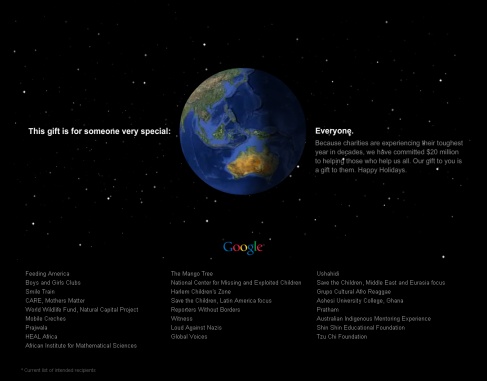
google donates $20 million to charity

google donates $20 million to charity for Christmas / Holiday 2009 season

Quote:

“Because charities are experiencing their toughest year in decades, we have committed $20 million to helping those who help us all. Our gift to you is a gift to them. Happy Holidays” – From Google

View their page

Google will be donating to these organizations:

  • Feeding America
  • Boys and Girls Clubs
  • Smile Train
  • CARE, Mothers Matter
  • World Wildlife Fund, Natural Capital Project
  • Mobile Creches
  • Prajwala
  • HEAL Africa
  • African Institute for Mathematical Sciences
  • The Mango Tree
  • National Center for Missing and Exploited Children
  • Harlem Children’s Zone
  • Save the Children, Latin America focus
  • Reporters Without Borders
  • Witness
  • Loud Against Nazis
  • Global Voices
  • Ushahidi
  • Save the Children, Middle East and Eurasia focus
  • Grupo Cultural Afro Reaggae
  • Ashesi University College, Ghana
  • Pratham
  • Australian Indigenous Mentoring Experience
  • Shin Shin Educational Foundation
  • Tzu Chi Foundation
Posted in Marketing, Tech Opinion | Tagged , , | Leave a comment

More Fields for WordPress 2.9+

Update (3/22/10)

I just added a link so you can download the version I am currently using with WP 2.9. It may not be perfect but it seems to be getting the job done well enough :)

MoreFields for WordPress History

Are you a long time user of More Fields who is upset that it broke with WordPress 2.8 and hasn’t been fixed yet? Me too.

I needed this for several projects so I hacked my own working version together with help from these folks.

MoreFields for WordPress 2.9+ download

Download my version (2010-03-22) here

Download my version (2009-12-20) here

Support, Requests, Etc

Feel free to comment on this page and send along your feedback. However, I’m not getting paid to keep this plugin up to date, I just need it for some projects, so don’t get mad at me if I’m behind the times with it. If you can help make improvements, send them to me and I’ll implement them.

More Fields for WordPress Description

If you are not familiar with More Fields, here is the description of More Fields for WordPress from the original plugin page.

More Fields is a WordPress plugin that adds boxes to the Write/Edit page. These boxes contains input fields, so that additional (more) fields can be added to a post. For example, if you write about books, you can add a box where you can enter title and author, etc. The boxes can be placed either to the right or to the left on the Write/Edit page.

In addition, the new version of More Fields enables you to define post types, which are custom Write/Edit pages that contains a pre-defined set of boxes. For example, you write about books and you write about your holidays, then you can define a post type ‘Book’ and a post type ‘Holiday’ each containing the input boxes relevant to each type of text. You can also set pre-defined categories, tags and templates for each post type.

With More Fields you can:

Add any number of boxes with any number of field to the Write/Edit page.
Add text, textarea, wysiwyg, checkboxes, radiobuttons and select lists as your input fields.
Create custom Write/Edit pages with a pre-defined set of input boxes, custom set categories, tags and templates.
Create archives based on Custom Fields values with custom slugs
Create boxes and post types programatically so that they can be created from within other plugins
List posts based on post type under the Manage menu
Set visiblitiy of a post type based on user level
Set global visiblity of boxes, in addition to the ‘Screen Options’ available for each post type for each user.

Posted in Web Development | Tagged , | 2 Comments

WordPress Query Object Properties

This is an example dump of the $wp_query object

Here is the code snippet I used to create this. I unset all the post data with the two unset commands.

global $wp_query;
$forReturn .= $wp_query->found_posts;
$temp = clone $wp_query;
unset($temp->post);
unset($temp->posts);
$forReturn .= print_r($temp, true);

Some of the items you’ll notice you can get to include WordPress’ Found Posts:

$wp_query->found_posts

$wp_query->post_count

$wp_query->query

WP_Query Object
(
    [query_vars] => Array
        (
            [cat] => 5
            [showposts] => 
            [count] => 
            [post_status] => publish,private,future
            [error] => 
            [m] => 0
            [p] => 0
            [post_parent] => 
            [subpost] => 
            [subpost_id] => 
            [attachment] => 
            [attachment_id] => 0
            [name] => 
            [hour] => 
            [static] => 
            [pagename] => 
            [page_id] => 0
            [second] => 
            [minute] => 
            [day] => 0
            [monthnum] => 0
            [year] => 0
            [w] => 0
            [category_name] => 
            [tag] => 
            [tag_id] => 0
            [author_name] => 
            [feed] => 
            [tb] => 
            [paged] => 0
            [comments_popup] => 
            [meta_key] => 
            [meta_value] => 
            [preview] => 
            [category__in] => Array
                (
                    [0] => 5
                )

            [category__not_in] => Array
                (
                )

            [category__and] => Array
                (
                )

            [post__in] => Array
                (
                )

            [post__not_in] => Array
                (
                )

            [tag__in] => Array
                (
                )

            [tag__not_in] => Array
                (
                )

            [tag__and] => Array
                (
                )

            [tag_slug__in] => Array
                (
                )

            [tag_slug__and] => Array
                (
                )

            [caller_get_posts] => 
            [suppress_filters] => 
            [post_type] => post
            [posts_per_page] => 10
            [nopaging] => 
            [comments_per_page] => 50
            [order] => DESC
            [orderby] => wp_posts.post_date DESC
        )

    [request] =>  SELECT SQL_CALC_FOUND_ROWS  wp_posts.* FROM wp_posts  INNER JOIN wp_term_relationships ON (wp_posts.ID = wp_term_relationships.object_id) INNER JOIN wp_term_taxonomy ON (wp_term_relationships.term_taxonomy_id = wp_term_taxonomy.term_taxonomy_id)  WHERE 1=1  AND wp_term_taxonomy.taxonomy = 'category'  AND wp_term_taxonomy.term_id IN ('5')  AND wp_posts.post_type = 'post' AND (wp_posts.post_status = 'future' OR wp_posts.post_status = 'publish' OR wp_posts.post_status = 'private') AND post_date < NOW() /* HERE 1 */  GROUP BY wp_posts.ID ORDER BY wp_posts.post_date DESC LIMIT 0, 10
    [post_count] => 10
    [current_post] => -1
    [in_the_loop] => 
    [comments] => 
    [comment_count] => 0
    [current_comment] => -1
    [comment] => 
    [found_posts] => 10
    [max_num_pages] => 1
    [max_num_comment_pages] => 0
    [is_single] => 
    [is_preview] => 
    [is_page] => 
    [is_archive] => 1
    [is_date] => 
    [is_year] => 
    [is_month] => 
    [is_day] => 
    [is_time] => 
    [is_author] => 
    [is_category] => 1
    [is_tag] => 
    [is_tax] => 
    [is_search] => 
    [is_feed] => 
    [is_comment_feed] => 
    [is_trackback] => 
    [is_home] => 
    [is_404] => 
    [is_comments_popup] => 
    [is_admin] => 
    [is_attachment] => 
    [is_singular] => 
    [is_robots] => 
    [is_posts_page] => 
    [is_paged] => 
    [query] => cat=5&showposts=&count&post_status=publish,private,future
)
Posted in Web Development | 3 Comments

Daily Show Widget

Get the Code

Posted in Random | Tagged , , | 1 Comment

Bigger Gmail Compose Box

A Gmail Compose Resize Extension for Google Chrome

Details:

Have you ever wanted a larger compose box for gMail? especially when using g-mail to reply to a conversation?

I give them credit, most times when composing a new message or using it in full-screen mode, it does well. But if you’re like me, about 80% of your conversations are replies. And that is, after all, what is great about g-mail, right? The awesome threading capabilities.

So why doesn’t g-mail support a resizeable compose box? You are stuck with a fixed size, of about 260 px, even in the Chrome browser!!! A browser that is know to let you resize text boxes by default!

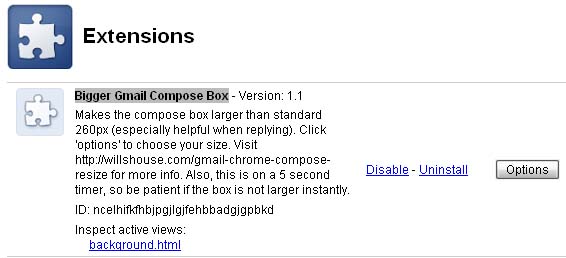
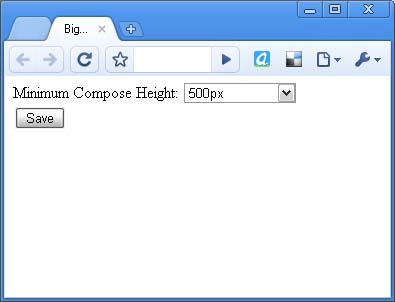
Well, I don’t know the answers to these questions, but they are frustrating, so I’ve written an extension for Chrome (or Chromium) which allows you to specify how big you want that box to be, and then it automatically resizes it (it make take a few seconds after you hit reply to fully grow).

Update: As of 2/7/2012 I’ve written a newer, and more updated extension download it here

Download the extension here:

Bigger Gmail Compose Box

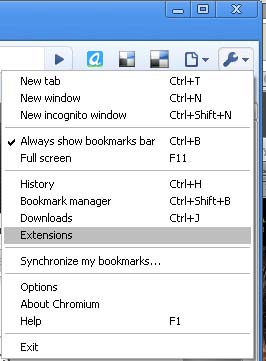
It has an options page, which you can access by going to settings (wrench icon) and then extensions. I have also added in auto-update for this extension. I’m really quite pleased with it and wanted to share.

Let me know what you think.

Having trouble? Didn’t know that Chrome allows extensions? You probably need to upgrade to the latest version. This is tested and working for the 4.x versions, so get the latest chrome now, and after downloading, you need to enable extensions.

Alternatively, if you want a one-click extension install, I suggest using Chromium (which is the development version of Chrome) because it has a lot more power and features and extensions are enabled by default.

See my posts on Downloading the latest Chromium and Chromium is not Chrome.

Also, for other great extensions, check out Chrome Extensions.

Bigger Gmail Compose Box
gmail compose resize for chrome
Gmail Compose Box Larger

Posted in Software, Tech Tips, Web Development | Tagged , , , , , , , , | 24 Comments