
Useful Unix Commands

To backup everything in the current directory, exclude anything ending with jpg:

tar cvf mybackup.tar --exclude "*.jpg" .

To exclude more than one type, just add another –exclude statement:

tar cvf mybackup.tar --exclude "*.jpg" --exclude "*.gif" .

Search current directory and sub directories for mp3 files:

find . -name \*mp3

Need to Learn: how to get the total size of the files returned by the above search command

AIX

Those were on RHEL, not aix – they will work for a lamp instance.  With AIX we have to consult the man tar page.

This should work:
find . \! -name “*.mp3” > inputfilelist
tar -cvf mybackup.tar -L inputfilelist

This should also work (in the opposite direction):
find . -name “*.mp3” > excludefilelist
tar -cvf mybackup.tar -X excludefilelist .

In either case, you can use this to see if there are any mp3 files in the archive:
tar -tvf mybackup.tar | grep mp3
Posted in Tech Opinion, Tech Tips, Web Development | Tagged | Leave a comment

Multiple Clipboards

I wish Windows had native capability for multiple clipboards, or clipboard cycling. There are a lot of third party clipboard apps, but I find them bulky and buggy for what they do. But it would be totally easy to hit ctrl+c an extra time to store something, or perhaps ctrl+v twice would past the penultimate item.

Posted in Software, Tech Opinion | Tagged , | Leave a comment

Reopen closed tabs – Chrome and Firefox

I love the Ctrl+Shift+T function to reopen your accidentally closed tabs in Firefox and Google Chrome. That’s the other thing that Chrome did right – used intuitive shortcut keys based on good industry standards (ie: Mozilla).

Posted in Tech Opinion, Tech Tips | Tagged , , | Leave a comment

Information Wants to be Free

I think it’s a fantastic philosophy. I agree – it does want to be free.

Posted in Random | Leave a comment

Google Chrome and Plugins

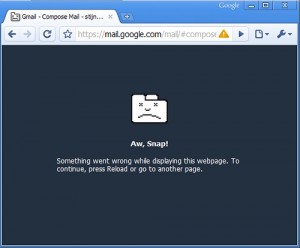
Google Chrome's Error Screen

Google Chrome's Error Screen

I really wish Google Chrome allowed plugins. Of course Google is probably not too happy about the idea as it might compromise stability of the browser. Plus it would mean they have less control over things – like greasemonkey scripts removing their clickTracking and sponsored ads.

But it’s a shame because the browser is so fast (mainly with Javascript), and it’s also pretty good with standards and features (like moving towards css 3 selectors), but mainly it just loads quickly and it doesn’t take up too many memory problems. (I realize that firefox would also load faster if I disabled some of my extensions, but they really just help speed up my workflow.)

Oh yeah, and Chrome’s break-away tab thing is pretty cool. I’d love to be able to move tabs between windows in firefox, or break them out more easily.

Oh, and finally it’s pretty cool how the browser has some built-in crash-protection / recovery which will keep the OS out of it. @google – Would love to see a (non-hacked) mac version.

Posted in Random | Tagged , | Leave a comment

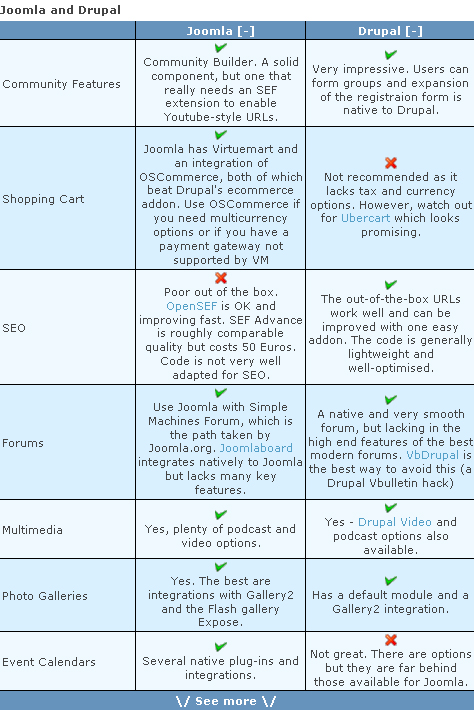
Drupal vs Joomla vs WordPress

jooomla

I’m trying to get a sense of how these three stack up against each other. It’s hard to know how many installations (worldwide) there are of each, since they are free and available for download, but this is a project of which I’m interested in adding some stats in the future.

software # installations user accounts developer accounts annual downloads
wordpress 2,600,000 ? ? ?
drupal ? 500,000 2000 1,500,000
joomla ? 255,000 ? ?

I do have to say that WordPress seems to be the most polished software of the three I’ve seen so far.

WordPress won’t create valid html code for my table, so I guess this document isn’t really XHTML 1.o compliant like my theme’s footer says. Sigh.

Posted in Random, Software | Tagged , , | Leave a comment

Xhtml Friends Network

XFN

Posted in Random, Web Development | Leave a comment

Support Ticket Software

Checking out osTicket as a possible ticketing & customer service product.

Posted in Software | Leave a comment

IE Hack – Hide Text on your Submit Buttons

The Issue:

I was not able to hide the text from the button, letting the underlying image to show it’s text. Normally my preferred image replacement technique is to have text in the background image and then use a negative text-indent at a high number like this:

background-image: url('my-picture-with-text.jpg');
text-indent: -9999px;

This works fine with submit buttons on most browsers, except IE.

The fix:

Add 2 extra lines to your css file:

color: transparent;
text-transform: capitalize;

For some reason the text indent dosn’t work by itself in IE, so after adding these 2 lines it works. It is a hack within a hack though, the color:transparent property should work by itself, but it doesn’t. For some odd reason setting the text-transform to anything (in this case I chose capitalize because I don’t use it very often) makes it magicly work. Anyhow if anyone finds this useful please leave a comment below.

Source

Posted in Web Development | Leave a comment

Stephen Hawking’s explosive new theory

clipped from www.telegraph.co.uk

Stephen Hawking’s explosive new theory

Prof Stephen Hawking has come up with a new idea to explain why the Big Bang of creation led to the vast cosmos that we can see today.

Big bang expansion

Astronomers can deduce that the early universe expanded at a mind-boggling rate because regions separated by vast distances have similar background temperatures.

They have proposed a process of rapid expansion of neighbouring regions, with similar cosmic properties, to explain this growth spurt which they call inflation.

But that left a deeper mystery: why did inflation occur in the first place?

Now New Scientist reports that an answer has been proposed by Prof Stephen Hawking of Cambridge University, working with Prof Thomas Hertog of the Astroparticle and Cosmology Laboratory in Paris.

blog it
Posted in Science | Leave a comment
