nVIEW desktop manager

If you have a recent version of the nVidia drivers, but are unable to find the nView Desktop manager, try accessing it via the control panel first.

nview desktop manager

Next, click the ENABLE button

nview desktop manager

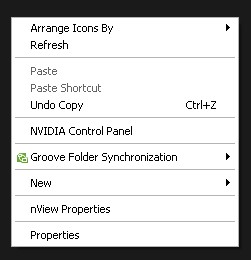
Now when right clicking the desktop you can choose nView properties and pull up the nVidea control panel

nview desktop manager

See my post on assigning keyboard shortcuts to nVidia color profiles (etc)

Thanks to fransa::tech for helping me figure this out

Disable nView Desktop Manager

Thanks to Michael for the following tip: If you want to disable nVidia nView desktop manager, you will need to run this command, and / or add it to your startup folder / tasks so that it runs each time you start windows:

rundll32 "c:\Program Files\NVIDIA Corporation\nView\nView64.dll", nViewCmd poff
Posted in Software, Tech Tips | Tagged , , | 4 Comments

Change Firefox Keyboard Shortcuts (Add-on / Extension)

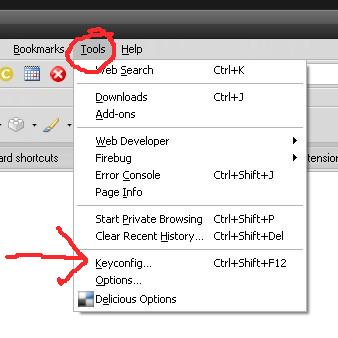
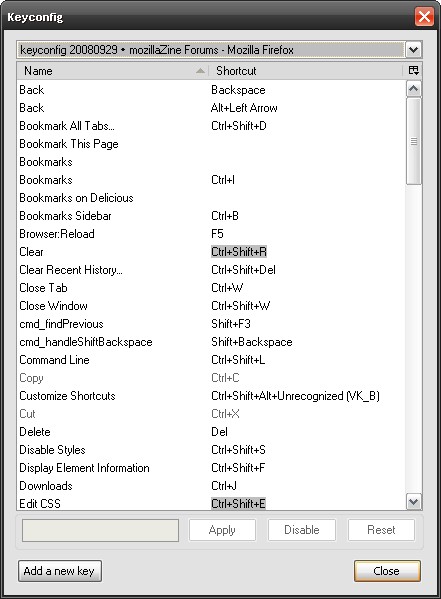
What you need is the KeyConfig add on.

Read about KeyConfig and how to configure your keyboard shortcuts

Download / Install KeyConfig here (there is no landing page, just a link to install directly – sorry! This addon  is not listed on the Firefox extensions page!)

keyconfig1 keyconfgi2

Posted in Software, Web Development | Tagged , | Leave a comment

Edit Perl Files in Dreamweaver (with color syntax highlighting)

Get the Perl / CGI Dreamweaver Extension

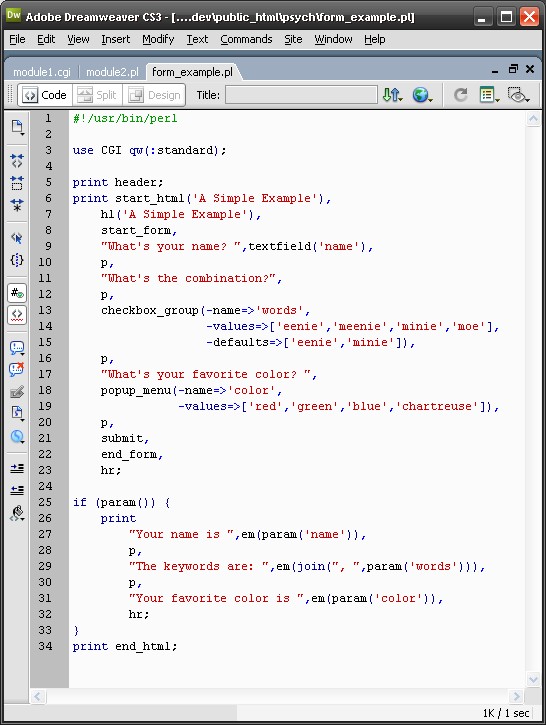
Edit PERL and CGI files in Dreamweaver with color colding and syntax highlighting. Didn’t think it was possible? Well, it is. The first step is to get the free Dreamweaver Extension: Perl Support.

Make it work with CGI

to get it to work with CGI files, a few minor tweaks are needed

Install the extension mentioned above. Then, make the following changes in these two files:

File 1: PerlDocumentType.xml
C:\Documents and Settings\user\Application Data\Adobe\Dreamweaver 9\Configuration\DocumentTypes\PerlDocumentType.xml
change
PL,PM:Perl files
to
CGI,PL,PM:Perl files

File 2: Extensions.txt
C:\Documents and Settings\user\Application Data\Adobe\Dreamweaver 9\Configuration\Extensions.txt

change:
winfileextension="pl,pm" macfileextension="pl,pm"
to:
winfileextension="pl,pm,cgi" macfileextension="pl,pm,cgi"

Problem Solved! Screenshot:

dw_perl

Also see these sites to learn more about this issue:

Posted in Software, Web Development | Tagged | 5 Comments

I [Heart] Sandbox

Cool sandbox designs from archgfx.net
clipped from archgfx.net

Sandbox Screenshot Logo

Sandbox 2 point 0000000000000000h!!!!

Sandbox Gray
blog it
Posted in Design | Leave a comment

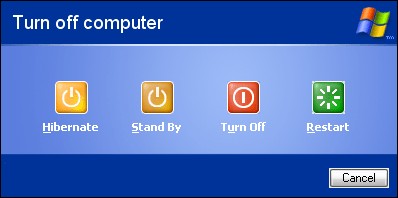
Add Hibernate To The Shutdown Menu

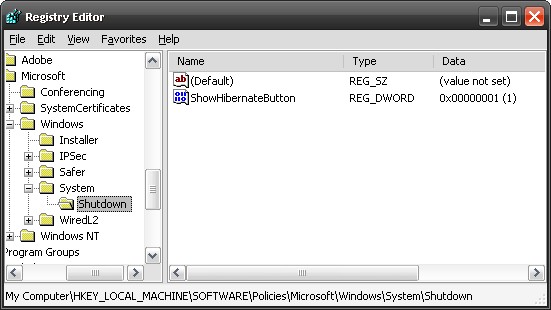
  1. Click Start, click Run, type regedit, and then click OK.
  2. Locate and then click the following registry subkey:
    HKEY_LOCAL_MACHINE\SOFTWARE\Policies\Microsoft\Windows
  3. Right-click Windows, point to New, and then click Key.
  4. In the New Key #1 box, type System, and then press ENTER.
  5. Right-click System, point to New, and then click Key.
  6. In the New Key #1 box, type Shutdown, and then press ENTER.
  7. On the Edit menu, point to New, and then click DWORD Value.
  8. In the New Value # 1 box, type ShowHibernateButton, and then press ENTER.
  9. Right-click ShowHibernateButton, and then click Modify.
  10. In the Value data box, type 1, leave the default Hexadecimal option selected, and then click OK.
  11. Quit Registry Editor.

Source: http://support.microsoft.com/default.aspx?…kb;en-us;893056

registry_hibernate

windows_hibernate_shutdown_menu

Posted in Tech Tips | Tagged | Leave a comment

Automate closing dialog boxes with RtvReco for Windows

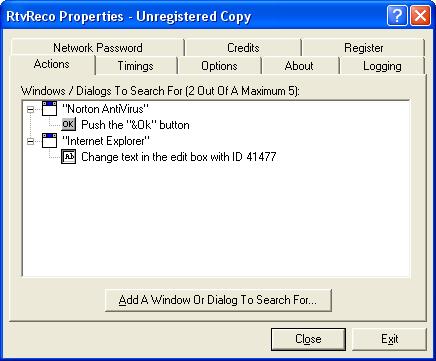
RtvReco is designed to automate many aspects of Windows, by pressing buttons in annoying dialog boxes, choosing menu items, maximising, and minimising windows for you.

RtvReco01


Posted in Software, Tech Tips | 1 Comment

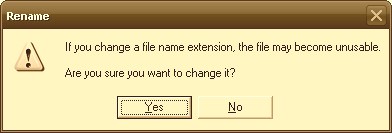
Changing a file’s extension: disabling the “If you change a file name extension, the file may become unusable…” warning

Are you sure you want to change it?

Yes, I’m quite sure I want to change it and I don’t want to be prompted.

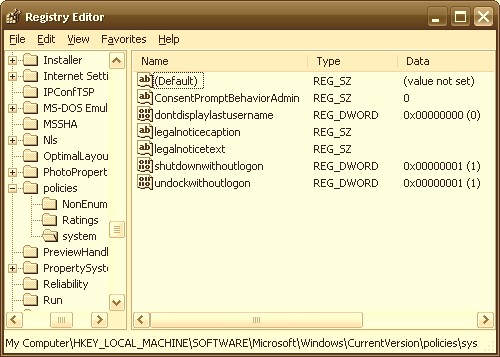
This posting suggests that to disable this annoying dialog, you can edit the registry:

[HKEY_LOCAL_MACHINE\SOFTWARE\Microsoft\Windows\CurrentVersion\Policies\System]

And set the value of ConsentPromptBehaviorAdmin to zero (0) and Reboot.

However, it also mentions that this doesn’t work, and the best found alternative is to use a 3rd party file browser (directory commander or something similar, or use RtvReco for Windows to automatically close it as soon as it appears.

rename_prompt

registry_window

Posted in Tech Tips | Tagged | 1 Comment

Dropbox is hiring

Web Engineer

Dropbox

San Francisco, CA

Dropbox is one of the fastest growing startups on the Internet. We want to become the way the world stores and shares files, and we’re well on our way.

We’re looking for someone great to join our small, hardcore team that manages billions of files and petabytes of data for millions of users; someone who would take pride in the very high standards we set for product quality and reliability.


This is a salaried full-time position with benefits. There is a two-week paid trial period. Salary will be commensurate with experience.

Role & Responsibilities


  • Developing new web-based features and interfaces for the Dropbox service.
  • Working with a team of developers to maintain and update the Dropbox website.
  • Enhancing our web-based administration and customer support interfaces.
  • Working with the Dropbox analytics team to continuously improve the presentation and mining of important company, product and user metrics.

Requirements

  • Bachelor’s degree in Computer Science.
  • Excellent work ethic and attention to detail. Very organized.
  • Fast learner.
  • Obsessive about quality and correctness.
  • Significant experience developing database-backed websites and web services using modern web standards.
  • Experience with a web MVC framework (Pylons, Django, Rails)
  • A strong portfolio of past work.
  • XHTML, CSS, and Javascript expert. Experienced with AJAX.
  • Proficient in Prototype or JQuery Javascript frameworks.
  • Proficient in Python or equivalent.
  • Proficient in MySQL.
  • Good design sense, experience working with a graphic designer and realizing complex mockups.
  • Knowledgeable about browser-specific issues and incompatibilities.
  • Excellent written and verbal communication skills.
  • Proficient in at least 2 of the 3 operating systems that we support (Windows, Mac OS X, Linux).
  • Understands web security issues.

Nice-to-Have’s

  • Startup experience.
  • Experience with Flash and ActionScript.
  • Experience with Photoshop.
  • Experience with the Cheetah templating engine.
  • Experience with VMWare.
  • Experience testing for the web (unit tests, Selenium, etc.)
  • Familiarity with the engineering challenges of file sync.
  • Experience with distributed version control systems (Mercurial, Git)

About Dropbox

At Dropbox we’re revolutionizing the way that people think about and access their files. In particular, we make it easy to securely share files with other people, sync them across multiple computers, access them from anywhere, and keep them safe.


Dropbox is a tech startup based in San Francisco. We’re well-funded by Sequoia Capital and Accel Partners (investors in Google and Facebook, respectively.) Since launching publicly 8 months ago we’ve attracted over a million users and are still growing rapidly. We’ve been featured in publications like the New York Times and TechCrunch, and have won awards from places like PC Magazine.


Our passion is making a product that rocks and putting it in millions of people’s hands. We offer competitive salaries and benefits, interesting challenges, and a fun work environment. We’re looking for great people to join us.


If you think you’re up to the challenge, please submit your resume and a brief cover letter (1 paragraph max) and some examples of your past work.

Apply

Posted in Web Development | Tagged | Leave a comment

Eight Tools for Capturing Screenshots in Firefox 3

clipped from mashable.com

Abduction! – Directed more at showing people errors in webpages or helping with development, Abduction will save all or a portion of a page, or just a frame, as a GIF, JPG or PNG.

FireShot – An extremely handy screenshot extension that can shoot just the visible area of a page or capture the entire thing, no matter how long it is.  Can be updated to a pro version that adds even more features such as an editor.  Allows you to save to BMP, GIF, JPG or PNG.

Grab Them All

iimmgg.com Tools

Kwout

Screengrab

Screengrab with Upload – A variation of the Screengrab extension in that you can automatically upload your screen captures to an online server to share them immediately.

Posted in Tech Tips | Tagged | Leave a comment

A firefox “custom button” for removing all domain cookies

Firefox custom button to Remove all Domain Cookies

You must have firefox custom buttons installed to use this

Posted in Tech Tips | 1 Comment