New Godaddy 404 page: Ever feel like you’re in the wrong place?

It’s kind of cool. Better than their old one.
New
New Godaddy 404 page: Ever feel like you're in the wrong place?
Old
Old Godaddy 404 Error Page

Posted in Web Development | Tagged , | Leave a comment

Xcode Install Assistant can’t be installed on Macintosh HD because Mac OS X version 10.7 or later is required.

Apple has now made Xcode free via the app store – unfortunately since Lion has been released they no longer allow anyone with Snow Leopord to download and install it from the App Store.

You can download it from their website for free, but you must be a registered Apple developer – which will set you back $99/yr.

Xcode Install Assistant can't be installed on Macintosh HD because Mac OS X version 10.7 or later is required.

Posted in Mac, Tech Tips | Tagged , , , | 1 Comment

Cache: Sarah’s Non-Traditional Job Search Experiment

This is a cache of a a webpage (http://livorna.com/job/) which was available on 8/26/2011.

Hi, I’m Sarah and I need a job. The traditional job search method seems to penalize me because I’m not very traditional. I thought I’d try something different.

I’ve been doing front-end web development for more than 10 years. HTML, CSS and JavaScript are my closest friends. I’ve been playing with Node.js, MongoDB and Ruby on my own lately. I’ve done PHP and Java in the past. I’m not entirely picky about technologies (just… no Microsoft please). I’m more concerned with working with good people and learning as much as I can.

I’m going to tell you some things about myself that aren’t things you would normally disclose in a job interview, but I’m going with this experimental angle. Don’t worry, there’s good things too.

So, here’s some not-necessarily-awesome-stuff about me:

  • I don’t have any friends or family that are remotely interested in computers, so I don’t have anyone to casually “talk shop” with and I tend to stumble when discussing things.
  • I read a wise thing recently: make sure you aren’t the smartest engineer at your job. I’ve failed at that pretty consistently. I’ve always been the one passing knowledge onto others, but rarely have I been the recipient.
  • I’m not an idea person. I’m a get-things-done person.
  • I think Twitter is silly.

And here’s some rather-awesome-things about me:

  • I’m smart and I learn really fast.
  • I’m extremely passionate about what I do. I love love love it.
  • I’m self taught in just about everything that I do.
  • I love getting thrown into projects where I have zero knowledge and having the opportunity to learn.
  • I make really awesome baked goods that I always share with my co-workers.

I don’t want to wear a suit and sit uncomfortably in your office for 4 hours trying to impress you with my words. I’d like to just come in and start working with some kick-ass people who are doing awesome things. I’m happy to volunteer for a bit to prove to you that I can do awesome things too. In turn, I get some mentoring and knowledge and eventually a paycheck (I do need to eat at some point).

Is there a nice company in the Boston metro area that’s willing to give me a non-traditional chance? I’d love to hear from you. :D

[email protected]

P.S. I have a real website with portfolio and more. This is just my experiment to see what this can do for me, but I’m also concerned it could hurt me, hence anonymousish. This isn’t intended to showcase my skills. It’s just a simple letter.

Posted in Marketing | Tagged , , | 1 Comment

Chrome Extensions Directory

Windows:
chrome_root\Application\chrome_version\Extensions\ 
Example: c:\Users\Me\AppData\Local\Google\Chrome\Application\6.0.422.0\Extensions\

Mac OS X:
/Applications/Google Chrome.app/Contents/Extensions/
or
~/Library/Application Support/Google/Chrome/Default/Extensions/

Linux:
/opt/google/chrome/extensions/
Posted in Mac, Tech Tips | Tagged | 1 Comment

Where Is Xcode Installed?

By default Xcode is installed to

/Developer/Applications/Xcode.app

How to Uninstall Xcode?

sudo /Developer/Library/uninstall-devtools --mode=all

Make sure you really want to do this before you remove it!

I also got a lot of these errors while uninstalling:

* Missing bundle identifier: /Library/Receipts/Office2008_en_core.pkg
2011-08-25 23:10:58.311 pkgutil[21830:903] PackageKit: *** Missing bundle identifier: /Lib
Posted in Mac, Software, Tech Tips | Tagged | 2 Comments

Hurricane Irene Videos

Space Station Crew Records Hurricane Irene Videos

From almost 230 miles above the Earth, cameras on the International Space Station recorded new video of Hurricane Irene, which is strengthening as it takes aim on the southeast Bahamas and, possibly, the East Coast of the United States.

Space Station Crew Records Hurricane Irene Videos: MyFoxPHILLY.com

TWC Hurricane Irene coverage 1999: Clip 2

TWC’s Exclusive Threat Level for Hurricane Irene

image


  • We’ve added an “EXTREME” threat level category from eastern North Carolina to southern New England. According to Hurricane Expert, Dr. Rick Knabb and Sr. Meteorologist, Stu Ostro, “this is a particularly threatening situation and it’s best for people to be on alert.
  • Computer models are currently trending toward a forecast solution of rare potency for portions of the Northeast.

image

Posted in Random | Tagged , | Leave a comment

Twitterbot

image
Twitter has a bot to crawl webpages: Twitterbot. I noticed it in the server logs. The user agent is Twitterbot/1.0. The IP address is 199.59.149.166. Why is twitter crawling web pages?

Google’s spiders regularly crawl the web to rebuild our index. Crawls are based on many factors such as PageRank, links to a page, and crawling constraints such as the number of parameters in a URL. Any number of factors can affect the crawl frequency of individual sites.

Posted in Marketing, Web Development | Tagged , | 1 Comment

Quicksilver Screen Capture Location

If you’re trying to change the Quicksilver Screen Capture Location, it can be tricky. By default these are stored on the Desktop. You can change the system defaults (using the tips below), which is what happens when you take a screenshot using cmd+shift+3 / cmd+shift+4. But Quicksilver does not acknowledge these changes / read the preferences.

You could just use the standard OS X key bindings for these. cmd+shift+3 for Capture Screen, cmd+shift+4 for Capture Region and cmd+shift+4 followed by space for Capture Window. The one advantage to the Quicksilver commands is that after they run, a new command window appears with the newly generated image selected as the object, ready for you to rename it or move it or do whatever you want.

Quicksilver Screen Capture Location

Changing the Screen Capture File Type (jpg/png/pdf/gif)

See http://www.jhuskisson.com/articles/changing-the-default-mac-screen-shot-image-type

How To Change The Default Screenshot Location on a Mac

When you do the basic Screenshot Command on a Mac the default location for the Screenshot to be saved is your desktop then you have to find them and put them into a Folder.

Well not anymore, by using a simple Terminal Command all your Screenshots can be placed into a Folder of your choice.

  1. First make a Folder on your Desktop or where ever you want to keep your Screenshot Folder, naming the Folder whatever you would like.
  2. Open your Terminal Window. Your Terminal can be found in Applications/Utilities on your Mac or found by going to the top right hand corner of your Screen and doing a search in Spotlight.
  3. Copy this defaults write com.apple.screencapture location
  4. Now Paste what you have copied into the Open Terminal Window
  5. Next Drag into the Open Terminal Window the Folder that you made to keep your Screenshots
  6. Once you have dragged your Folder into the Open Terminal Window you will see in Terminal a command line similar to this one – defaults write com.apple.screencapture location/Users/U2/Pictures/Screenshots
  7. This part of the Command line will be the same for everyone defaults write com.apple.screencapture location
  8. This part of the Command line will be different for everyone as it identifies the location of your Folder on your computer and the User name etc. /Users/U2/Pictures/Screenshots
  9. Now hit the Return on your Keyboard
  10. Close the Terminal Window
  11. Immediately restart your Computer
  12. Once you log back onto your Computer all your Screenshots should go directly to that new Folder that you just made!

How To Change the Default Location in Quicksilver

If you must change it in Quicksilver, you will need to download the plugin and recompile it. The path is hard coded into the plugin:

image

You can find the plugin in one of two places:

  • https://github.com/quicksilver/ScreenCapture-qsplugin
  • https://github.com/quicksilver/Plugins/tree/master/ScreenCapture

Posted in Mac, Software | Tagged | Leave a comment

Tweak UI for Mac / OS X

There is in fact a “Tweak UI” for Mac OS X. It’s called Deeper. It’s free. You can download it here:

Deeper is a personalization utility for Mac OS X. Deeper allows you to enable and disable the hidden functions of Finder, Dock, Dashboard, Expose, Safari, Login window and many Apple’s applications.

Tweak UI for Mac / OS X

Deeper (Tweak UI for Mac / OS X)

Posted in Mac, Software | Tagged | Leave a comment

Paraphrase Tool

The Paraphrase Tool – for Mac / OS X

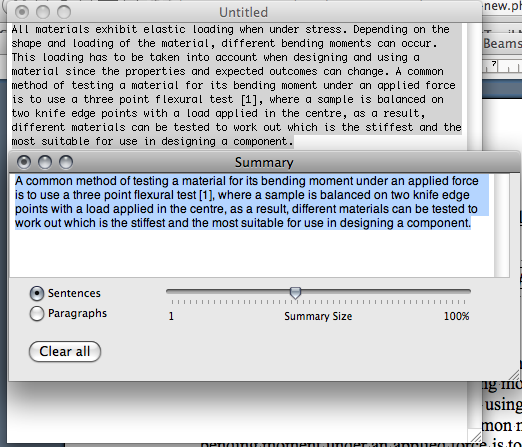
If you need to pare down text on mac os x, you might want to try the Summary Service. You can select text from most applications (Safari, Text Edit, etc) and then choose the apple menu, services, and then summary. If the application you are using doesn’t support services, copy the text to a TextEdit document to get a summary.

Mac / OS X Paraphrase Tool

As you can see, you will be able to edit how long you want the summary to be and if you want it in sentences or paragraphs. The accuracy of the summaries has actually been quite impressive in my past experience with this great feature.

On Mac OS X this tool can be found at `/System/Library/Services/SummaryService.app`

Posted in Mac, Software | 1 Comment