Pandora One: 3 Day Free Trial

Pandora is currently offering a 3-day free trial, sponsored by MSN. If you don’t see the ad while listening to Pandora, try using this link:

http://www.pandora.com/#/account/startTrial/MSN

There is also a 24 hour free trial available:

http://www.pandora.com/#/account/startTrial/PandoraE1

If you are already in the player, you may need to close it and then paste that link into your browser.

No credit card information is required for the trial, but you must create an account. Also, if you have ever had a free trial with your account before Pandora will alert you to that fact and refuse another trial.

Have a different link? Paste it into the comments below! :)
Posted in Marketing, Tech Tips | Tagged | Leave a comment

cURL via SSL return http_code 0 (WAMP)

I was having some trouble on a WAMP installation when trying to cURL an encrypted site over port 443. The cURL response was not helpful at all, it was as follows:

[url] => https://encrypted.google.com/
[content_type] => text/plain;charset=utf-8
[http_code] => 200
[header_size] => 229
[request_size] => 170
[filetime] => -1
[ssl_verify_result] => 0
[redirect_count] => 0
[total_time] => 0.027
[namelookup_time] => 0
[connect_time] => 0.002
[pretransfer_time] => 0.004
[size_upload] => 0
[size_download] => 227
[speed_download] => 8407
[speed_upload] => 0
[download_content_length] => 227
[upload_content_length] => 0
[starttransfer_time] => 0.027
[redirect_time] => 0

After quite a bit of researching, I found that the problem was related to checking the certificate.

curl_setopt($ch, CURLOPT_SSL_VERIFYPEER, false);

The aforementioned fix works, but it is sort of quick-and-dirty. If you’d like to know the proper way to fix this, you’d need to use the CURLOPT_CAINFO option. See this post for details.

Posted in Web Development | Tagged , , | Leave a comment

Ruby on Rails: Setting up a new Application

step 1: rails new ___  (__ is the name of your app, no spaces or punctuation)

step 2: rails generate scaffold posts (generate some basic framework)

Posted in Web Development | Tagged , | Leave a comment

Three Extensions to Protect Privacy against Google

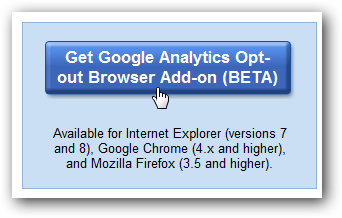
remove-tracking1) Google Analytics Opt-Out

Keep Google From Tracking You Online; This extension works in all browsers:

http://tools.google.com/dlpage/gaoptout

2) Remove Google Redirects

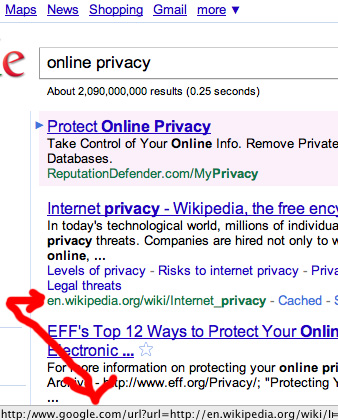
If you’ve ever looked at the URL’s that Google actually populates into the href values of its search results, you’ll see that each one of them redirects through google, so they can see exactly what you’re clicking on. Get rid of that nonsense with this script. You can install it directly with Google Chrome – for Firefox you’ll need to install Greasemonkey.

http://userscripts.org/scripts/show/69054

3) Tracking Token Stripper

FeedBurner and similar links often include Google Analytics tracking tokens in the URL’s query string. These start with the prefix “utm_” (Urchin Tracking Monitor). They are used by the target site to report back statistics regarding the origin of the inbound link.
This extension removes those tokens from the URL once the destination site has been visited, resulting in a cleaner URL that’s more suitable for copying into an email, an instant message, etc.
https://chrome.google.com/extensions/detail/kcpnkledgcbobhkgimpbmejgockkplob

Posted in Tech Tips | Tagged , | 2 Comments

rvm: how to install the latest version of ruby

rvm install ruby-1.9.2-p136

If that doesn’t work, try this command first:

source ~/.rvm/scripts/rvm
Posted in Web Development | Tagged , | Leave a comment

Summer Avery – Craigslist Spam

Just wanted to let you know that Summer Avery also appears to be spamming Craigs list. Here is the message I received today:

Hello. i came accross you're add on Craigslist, i was just wondering
if you'd be interested in a way to work at home? With the new year, a
lot of people's resolutions were to get a job... let me know if you're
lookin for a job and you are a serious worker.

Don’t reply to this nonsense! These spammers / bots are looking to harvest e-mail addresses or attempt fraudulent transactions.

Did you get a similar message? Please, leave a note below :)

Posted in Marketing | Tagged , | Leave a comment

Shtyle.fm: Another Scam

Like Shoppybag.com, Shtyle.fm is a website set up as a viral advertising scam. The website will let you “set up an account” after receiving an invitation, and then request credentials to your e-mail account – which it then uses to send out a message to all of your contacts.

What should I do?

If you receive a message from Shtyle.fm, ignore it or delete it. If you have already “created an account” with them, don’t go back. Change the password to your e-mail account(s) and mark messages from them as spam, or just delete them.

Posted in Marketing, Tech Tips | Tagged | Leave a comment

Error 406 on Insert Image with WordPress (and/or 404 Not Found)

If you are getting a 406 error when trying to insert an image into a wordpress post, it is probably something to do with mod_security. Mod_security is an apache module that looks for matching patterns / content-types in webpage requests (like the POST needed to insert an image) and will throw a 406 error, or perhaps a 501 error, when it thinks an attack is being made.

If you run your own server, then disable mod_security. If you are on a hosted server, ask your hosting company to disable mod_security for your account (many of them will do this, bu they generally have it enabled by default).

Posted in Web Development | Tagged , | Leave a comment

GMMXIE

GMMXIE means 2011, in Google Terms. It is derrived from the Roman Numerals M (1000), X (10) I (1). G does not have any meaning in Roman numerals. So, GMMXIE is Google’s way of saying “Happy New Year” for 2011!

Additional Roman Numerals:

Symbol Value
I 1 (one) (unus)
V 5 (five) (quinque)
X 10 (ten) (decem)
L 50 (fifty) (quinquaginta)
C 100 (one hundred) (centum)
D 500 (five hundred) (quingenti)
M 1,000 (one thousand) (mille)

(The odd thing is that I read this GMMXLE instead, as the I looks like an L)

Posted in History, Etymology, Social Media | Tagged , , | 4 Comments

Conclusion: Hackintosh on a Dell XPS 630

xps 630 hackintoshAfter doing quite a bit of research, I think it seems fairly impossible to successfully install Mac OS X on a Dell XPS 630i.

  1. The first steps involved removing one of the video cards, and removing ram so that the system only had 4GB installed.
  2. Next, I used iBoot and the official Snow Leopard 10.6 install CD. The standard configuration throws errors, so I used the options -v -f -x. The -v flag is what shows you the lines of code (as opposed to the gray screen with the apple on it).
  3. After that, I received a “Still waiting for root device” error. This means that the installation can not access the hard disk. The solution to this on most systems is to adjust the AHCI mode, or “If you are using a SATA disk, make sure it is set for IDE legacy mode in the PC BIOS and not ‘enhanced'” – unfortunately the XPS 630 has very limited options in the BIOS, and none of these things are present.
  4. Another option to get past that error would be having an IDE hard drive present in the system – however, I don’t believe any of the XPS 630i systems have an IDE connector.
  5. Finally, using a custom version of OSX, like OSx86, or a 10.4 or 10.5 version with custom ktext drivers might be able to solve this problem, but A) I couldn’t find a good version, and B) I wanted to run 10.6 and not anything earlier.

Please post comments if you have had any more luck than I did! :)

You might also check the Hackintosh Wiki as a good resource for the still waiting on root device error.

Posted in Mac, Tech Tips | 1 Comment